Top 10 Generative AI Use Cases Transforming Enterprise Operations
Table of Contents
Quick Summary
Generative AI is no longer just helping businesses create content or complete small tasks faster. It is now helping enterprises reduce manual work, speed up decisions, and improve operations across customer support, document processing, forecasting, compliance, sales, HR, supply chain, and IT. But the real value comes when businesses choose the right use cases, connect GenAI with trusted business data, and turn it into measurable business impact.
Generative AI tools like ChatGPT, Gemini, Claude, Copilot, and Perplexity have already come a long way for businesses. From generating content, images, and videos to writing code, analyzing data, brainstorming ideas, and more, businesses are using GenAI in many ways to stay competitive.
But as an enterprise leader, you may ask: Is that enough? Or are there bigger ways to use generative AI to transform business operations in 2026?
That is where this blog comes in. Here, we have covered the top generative AI use cases transforming enterprise operations, the real business value they create, and what leaders should consider before scaling GenAI beyond isolated pilots.
What Makes a Generative AI Use Case Enterprise-Ready?
No matter what business you run or which industry you operate in, you now have access to many generative AI tools. But are those tools ready for real business operations? In many cases, not yet.
Why?
Because enterprise adoption comes with practical challenges:
- AI pilots look good in demos but fail in messy workflows
- Enterprise data is scattered across CRM, ERP, HRMS, helpdesk, documents, and analytics platforms
- Teams cannot fully trust AI outputs without human review
- Security, privacy, and compliance concerns slow down adoption
- AI tools often stay disconnected from the systems where work actually happens
- Leaders cannot always measure business value beyond “time saved”
That is why enterprise readiness matters.
At Capital Numbers, we have worked with clients who are not just looking for AI features. They want Generative AI solutions that solve operational problems, connect with existing systems, protect business data, and create measurable impact.
An enterprise-ready generative AI use case should be able to:
- Use approved business data, not generic or outdated information
- Connect with existing systems like CRM, ERP, HRMS, helpdesk, or analytics platforms
- Support human review where decisions affect customers, employees, finance, legal, or compliance
- Follow access control, privacy, and compliance rules from the start
- Handle messy real-world inputs, not just clean demo scenarios
- Show measurable impact, such as faster resolution, fewer errors, higher productivity, lower costs, or better customer experience
The point is simple: enterprise AI is not about using the most advanced model. It is about building a use case that solves a real business problem, works safely inside the organization, and proves its value with outcomes leaders can measure.
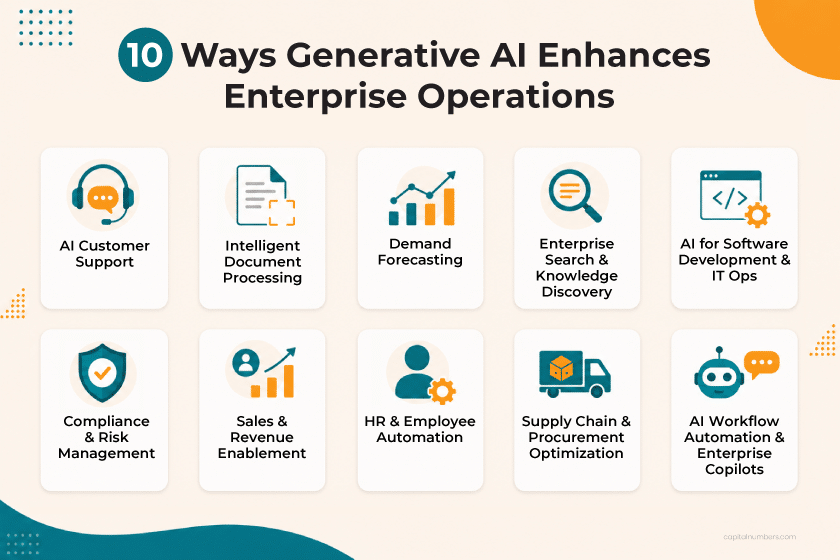
10 Ways Generative AI Enhances Enterprise Operations
A 2025 Wharton AI Adoption Report found that 82% of enterprise leaders now use GenAI at least weekly, and 72% of organizations are formally measuring GenAI ROI. That shift says something important: enterprise leaders are no longer asking whether GenAI is useful. They are asking where it can create measurable business value.
The following generative AI business use cases show how enterprises can reduce manual work, speed up decisions, improve visibility, and make Generative AI part of how operations actually run.
1. Customer Service Automation and AI Support Agents
Customer service is one of the most practical generative AI business use cases because the pressure is visible every day.
More tickets. More channels. Faster response expectations. And AI agents still need the right customer context to solve anything well.
GenAI can help support teams with:
- AI chatbots and virtual agents
- Ticket summarization
- Suggested responses for agents
- Knowledge-base answers using RAG
- Case routing and escalation
- Customer sentiment analysis
The operational impact of automating customer service? Faster response times, lower support backlog, better agent productivity, and more consistent customer experience.
The best use of GenAI in customer service automation here is not replacing teams. It is helping your support team respond faster with better context. When connected to CRM, helpdesk, order history, and approved knowledge bases, an AI support agent can summarize past interactions, identify the likely issue, suggest the next response, and escalate when human judgment is needed.
For example, in one of our AI-powered messaging platform projects, we helped improve customer experience through automation and centralized communication. It shows how AI chatbots, automated workflows, real-time messaging, and system integrations can make customer service faster, more consistent, and easier to manage at scale.
2. Intelligent Document Processing
Documents are essential to every business, but they are also among the biggest reasons work slows down. Contracts. Invoices. Claims. KYC forms. Compliance reports. Vendor documents.
They move from one team to another, wait for review, come back with missing details, and often delay the next step.
Generative AI can support document-heavy workflows such as:
- Invoice processing
- Contract review
- Insurance claims analysis
- KYC document checks
- Compliance report review
- Vendor onboarding documents
Here, the value is not only speed. It includes fewer missed details, cleaner handoffs, faster approvals, and better visibility into document-related risks.
Traditional OCR (Optical Character Recognition) can extract text. It is useful, but limited.
GenAI can go further in processing documents intelligently. It can summarize clauses, compare terms, flag missing information, identify risks, and route documents based on business rules. For example, instead of only extracting invoice fields, a GenAI-enabled workflow can explain why an invoice does not match a purchase order, summarize the exception, and send it to the right reviewer.
That is the real shift: document processing moves from data capture to decision support.
3. Demand Forecasting and Business Planning Support
Demand forecasting often looks like a data problem. But in reality, it is a business coordination problem.
Sales wants to know what customers may buy next. Finance needs more reliable numbers. Procurement needs to plan purchases. Supply chain teams need early warning before shortages, delays, or excess inventory become expensive.
This is where generative AI business use cases go beyond automation. Generative AI can help planning teams make sense of forecasts faster by supporting:
- Demand trend summaries
- Inventory planning inputs
- Sales forecast explanations
- Scenario comparisons
- Forecast variance analysis
Instead of giving leaders another dashboard to interpret, GenAI can help explain what changed, why it matters, and what the business should watch next.
For example:
- Why did demand drop in one region but rise in another?
- What happens if a supplier delay continues for two more weeks?
- Which product category is showing early signs of overstocking?
- What assumptions changed between this month’s and last month’s forecast?
Generative AI does not replace predictive analytics or forecasting models. The stronger use is interpretation. It turns forecast data into business-readable insight so sales, finance, procurement, and supply chain teams can act with the same context.
4. Enterprise Search and Knowledge Discovery
Most enterprises do not lack information. They lack quick access to the right information.
The answer may already exist – in a policy file, CRM note, internal wiki, project ticket, dashboard, email thread, or technical document. But employees still lose time searching across systems.
GenAI can improve enterprise knowledge discovery through:
- Internal knowledge assistants
- Policy and process search
- Technical documentation lookup
- HR and compliance knowledge access
- Sales enablement search
- RAG-based answers from approved sources
The business value is clear: less time spent searching, faster onboarding, fewer repeated questions, and better use of internal knowledge.
This is where RAG (Retrieval-Augmented Generation) matters in the enterprise search. RAG is a technique that allows GenAI systems to retrieve answers from specific approved data sources rather than relying on general model training.
For narrow workflows, SLMs (Small Language Models) – compact AI models optimized for specific internal tasks, offering easier governance and cost efficiency compared to large general-purpose LLMs can also be useful. They are often easier to govern, more cost-efficient, and better suited for specific internal tasks than large general-purpose LLMs.
For CXOs, the question is not “Which model is most powerful?” It is “Which setup gives us the right balance of accuracy, cost, privacy, and control?”
5. Software Development and IT Operations Acceleration
According to Bain & Company, two-thirds of software firms have rolled out GenAI tools, yet teams typically see only 10–15% productivity boosts, and those gains often don’t translate into business value without redesigning processes across the full development lifecycle.
And that makes sense.
In software development teams, the slowdown is not always coding. It is also understanding old code, writing tests, fixing bugs, reviewing pull requests, updating documentation, checking logs, and moving work through DevOps pipelines.
GenAI works best as an AI helper for developers when it supports the tasks that slow delivery, such as:
- Code generation and refactoring
- Code review assistance
- Test case generation
- Bug triage
- Incident summaries
- Legacy code explanation
- DevOps runbook support
We also use generative AI tools across the software delivery lifecycle. But we do not treat AI output as production-ready by default. Senior engineers still own the decisions that matter: architecture, security, performance, code quality, and release readiness.
That balance is important. GenAI can speed up development, but an engineering discipline keeps the output reliable, secure, and ready for real users.
6. Compliance, Risk, and Audit Support
Suppose your compliance team is preparing for an audit. The evidence is spread across policies, vendor files, control reports, emails, spreadsheets, and internal systems. The challenge is not only finding it, but proving that the right controls are in place.
Enterprise generative AI can help with:
- Policy and control review
- Regulatory change summaries
- Audit evidence collection
- Risk report preparation
- Vendor due diligence support
- Compliance gap analysis
In practice, GenAI can compare policy versions, flag missing evidence, summarize control changes, and draft initial audit responses.
But this is also where governance matters most. For compliance workflows, GenAI should work with access controls, audit trails, source citations, approval workflows, and role-based permissions. Final decisions should still stay with compliance, legal, or risk teams.
The outcome is faster audit preparation, cleaner evidence handling, stronger compliance visibility, and lower manual review effort.
7. Sales and Revenue Operations Enablement
In sales, delays often happen before the actual conversation. Sales representatives spend time checking CRM notes, reviewing past emails, finding proposal content, and preparing follow-ups before they can move a deal forward.
GenAI can support sales and revenue teams with:
- Account and opportunity summaries
- Call preparation notes
- CRM note cleanup
- Proposal and RFP draft support
- Lead qualification inputs
- Follow-up email drafts
- Deal risk signals
The real value is context. GenAI helps teams understand account history, buyer concerns, open objections, and next best actions faster.
For sales leaders, that means cleaner CRM data, faster proposal turnaround, better pipeline visibility, and more consistent follow-ups.
8. HR, Employee Support, and Internal Service Automation
HR, IT, and internal service teams often answer the same questions again and again. What is the leave policy? How do I access this system? Where is the onboarding checklist? Who approves this request?
GenAI can support internal operations with:
- HR policy assistants
- Employee onboarding support
- IT helpdesk automation
- Training content support
- Internal request routing
- Leave, benefits, and policy queries
The key is grounding. Employee-facing GenAI should draw on approved HR policies, IT documentation, onboarding guides, and internal workflows, not generic internet knowledge.
For large or distributed enterprises, this can reduce internal ticket volume, improve onboarding, and give employees faster access to the right information.
9. Supply Chain, Procurement, and Vendor Management
Supply chain and procurement teams deal with constant changes — supplier delays, vendor risks, contract reviews, inventory gaps, and pending purchase approvals. These may look like small issues, but they can affect cost, delivery timelines, and customer commitments when teams cannot respond quickly.
GenAI can support teams with:
- Supplier risk summaries
- Procurement document review
- Contract comparison
- Purchase request assistance
- Inventory exception summaries
- Vendor performance analysis
The real value is visibility. What changed? Which vendor or order needs attention? Where should the team act next?
Generative AI helps teams answer these faster, so procurement and supply chain leaders can improve vendor visibility, speed up procurement cycles, reduce contract review effort, and respond quickly to disruptions.
10. AI-Powered Workflow Orchestration and Enterprise Copilots
This is where Generative AI moves beyond assistance. Not just answering questions or summarizing documents, but helping work move across systems.
Enterprise copilots and AI agents can support:
- Multi-step workflow automation
- Data retrieval and action support
- Human approval workflows
- ERP, CRM, helpdesk, and analytics integration
- Cross-functional task coordination
This is one of the more advanced generative AI business use cases because it connects information, decisions, and actions into a single flow. For CXOs, this is where generative AI in business operations can reduce manual handoffs, improve visibility, and speed up cross-functional work.
But controls matter. AI agents need clear permissions, approved tools, audit logs, approval steps, and human escalation paths. Without them, automation can create more confusion than value.
How to Choose the Right Generative AI Use Case
The best GenAI use case is not the one that sounds the most advanced. It is the one that solves a real problem your team faces every day and creates an impact you can actually measure.
Before you decide whether to buy, build, or partner, ask:
- Where is your team losing time?
Look for work that involves too much reading, searching, summarizing, reviewing, or answering the same questions repeatedly. - Does the use case need your internal data?
If the answer depends on policies, customer records, tickets, invoices, or reports, GenAI must work with approved business data. - Can someone check the output?
For sensitive tasks, a person or system should be able to review the answer before it is used. - What business outcome will improve?
Faster response? Fewer errors? Lower cost? Better productivity? Improved customer experience? Be clear before you start. - Can you govern it safely?
The use case should support access control, privacy, compliance, audit logs, and human handoff when needed.
Final Word: Use GenAI Responsibly
After going through these enterprise use cases of generative AI, you now have a clear idea of where you can use it in your business operations. But knowing where to use GenAI is not enough. You also need to think about how to implement it.
This is where ethical implementation becomes important.
For enterprises, this means protecting sensitive data, creating a clear AI usage policy, training employees, adding human review where needed, reducing bias, and keeping audit trails for important decisions.
These steps help make GenAI safer, more reliable, and easier to scale. So, do not treat GenAI as just another tool. Treat it as a business capability that needs the right use case, data, and guardrails. That is how it can move from experiment to real operational value.
Work with Capital NumbersCapital Numbers helps enterprises turn GenAI ideas into practical, production-ready solutions. We help with architecture, data integration, governance, security, testing, and ethical implementation. Whether you are choosing your first GenAI use case, building a proof of concept, or improving an existing solution, we can help you move forward with clarity. Ready to explore GenAI for your business? Schedule a discovery call today →
Frequently Asked Questions
1. How do I know which generative AI use case is right for my business?
Start with the work that takes your team the most time — reading, searching, summarizing, reviewing, or answering repeated questions. If it relies on internal data and the output can be verified before action, it’s a strong candidate. The most successful enterprise GenAI projects begin with one painful, measurable workflow, not a broad transformation.
2.How long does it take to implement generative AI in an enterprise?
A focused use case — like intelligent document processing or an internal knowledge assistant — can go from pilot to production in 8–16 weeks. Delays usually stem from data readiness, system integration, and internal alignment on ownership and governance, not the AI itself.
3. How do I measure the ROI of a generative AI implementation?
You can start by defining the baseline first: process time, errors, and cost per cycle. After implementation, measure the delta: faster resolution, fewer errors, lower headcount dependency, or higher throughput. The clearest ROI comes from metrics set before the project, tied to cost, revenue, or risk reduction, not just productivity.
4. Is generative AI only practical for large enterprises with big budgets?
No. Mid-size companies often move faster thanks to fewer legacy systems, shorter approval chains, and clearer workflows. A well-scoped use case needs clean data, a clear problem, and realistic governance — not enterprise-scale infrastructure. Size isn’t the limit; scope discipline is.
5. What should my organization have in place before implementing generative AI?
Three things matter most. First, data readiness — relevant data should be accessible, reasonably clean, and clearly owned. Second, a defined business problem — a specific slow or error-prone workflow with clear success metrics. Third, a governance baseline — who reviews outputs, handles errors, and ensures compliance. Skipping these steps wastes time fixing foundations instead of creating value.


 Web Development
 Cloud Engineering
 Mobile App Development
 AI/ML/GenAI
 E-commerce
 Software Development
 UI/UX
UI/UX QA
QA Dedicated Teams