

How to Integrate AI Into Your CRM, ERP, or Helpdesk Without Rebuilding From Scratch
Table of Contents
Quick Summary
Most businesses don’t need to replace their CRM, ERP, or helpdesk systems to use AI; they need to connect them better. AI can be layered onto existing systems through APIs, native AI capabilities, retrieval layers, middleware, and controlled AI agents to support lead scoring, demand forecasting, ticket routing, workflow automation, and decision support. The biggest AI integration failures aren’t model problems; they are usually data quality, governance, workflow design, and adoption problems.
This guide explains how to add AI safely, starting with one workflow, without disrupting the systems your teams already depend on.
Most Mid-Market Businesses Do Not Have an AI Problem. They Have an Integration Problem.
Many established mid-market and growth-stage businesses already depend on systems that support their sales, finance, operations, and customer service teams.
They may use Salesforce, HubSpot, Microsoft Dynamics, NetSuite, SAP, Zendesk, Freshdesk, or custom platform that employees use every day.
The concern is simple: does adding AI mean rebuilding what already works? It does not.
AI integration is about augmentation, not replacement. Your CRM, ERP, and helpdesk already hold years of business data. AI helps make that data easier to search, faster to act on, and more useful in daily decisions, without forcing a system migration your teams didn’t ask for.
This guide explains how to integrate AI into your CRM, ERP, or helpdesk without having to start from scratch.
Why You Do Not Need to Replace Existing Systems to Add AI
You do not need to rebuild your CRM, ERP, or helpdesk to use AI. Most AI capabilities can be added through native platform features, APIs, middleware, RAG, secure data pipelines, custom integration layers, or AI systems that act autonomously with controlled permissions.
The difference is simple:
- Replacement means moving away from the existing system.
- Augmentation means keeping the system of record and adding AI around it.
That distinction is particularly important for mid-market businesses. A complete system replacement can require a large budget, lengthy procurement, extensive data migration, employee retraining, and months of operational disruption. A focused AI integration can address a specific business problem without creating the same level of cost or organizational risk.
Your existing platforms already hold years of business knowledge:
- CRM data, such as customer conversations, lead history, sales activities, and account notes
- ERP data such as financial records, procurement flows, inventory details, approval rules, and reports
- Helpdesk data, such as support tickets, customer issues, resolutions, and recurring pain points
Rebuilding everything from scratch can create migration risk, downtime, cost overruns, user resistance, and months of retraining. AI offers a more practical path. Connect, enrich, automate, and govern, without asking your teams to start over.
AI agents take this further than conventional chatbots. They can retrieve business context, call approved tools, maintain task context, complete multistep workflows, and request human approval when an action exceeds their permissions.
Businesses can use native capabilities available within platforms such as Salesforce, HubSpot, Microsoft Dynamics, NetSuite, SAP, Zendesk, Freshdesk, and ServiceNow. Custom and older systems can be supported through APIs, middleware, data pipelines, and controlled agent workflows. The appropriate approach depends on the company’s existing technology, budget, data readiness, and operational priorities.
How Does AI Integration Work in a CRM
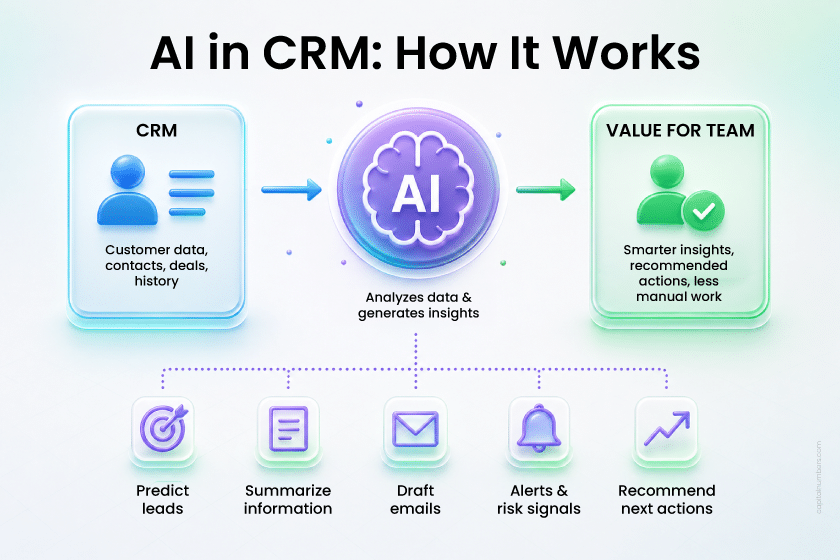
AI integration in a CRM works best when it reduces the daily effort of sales and customer-facing teams.
Think of a business using Salesforce, HubSpot, Microsoft Dynamics, or a custom CRM platform. Sales representatives spend time qualifying leads, preparing for calls, writing follow-up emails, updating deal stages, and checking account history. These tasks are important, but many are repetitive.
According to Salesforce’s 2026 State of Sales report, 85% of sales representatives using AI agents say the technology gives them more time to focus on higher-value work. This is where CRM integration matters: AI should reduce repetitive preparation and administrative work without becoming another disconnected tool.
AI can help CRM teams with:
- Predictive lead scoring
- Customer and account summaries
- Sales call and meeting summaries
- Follow-up email drafts
- Deal health signals and renewal risk alerts
- Next-best-action recommendations
- CRM field updates from call notes
AI agents that retrieve account context, call approved CRM tools, and complete multistep sales tasks within defined permissions.
Here is what that looks like in practice.
A sales representative preparing for a renewal call receives a clear summary of the customer’s account history, open support issues, recent usage patterns, previous pricing discussions, and likely risks before making the call.
Instead of reading six months of notes and tickets, the representative enters the conversation prepared. The same AI layer can draft the follow-up email and suggest updates to the CRM record for the representative to approve.
The measurable outcome is not simply whether the summary is accurate. The business should compare preparation time, CRM update time, follow-up speed, and renewal outcomes before and after the integration.
For platforms such as Salesforce, HubSpot, or Microsoft Dynamics, businesses can often start with native AI capabilities such as lead scoring, summaries, recommendations, and email assistance without changing the existing CRM data model.
For custom CRM platforms, native APIs can provide current structured records, while RAG can retrieve relevant notes, emails, documents, and knowledge. Middleware may be required when information is spread across several systems. Controlled AI agents can then use approved tools to update records or trigger workflows, with human approval for sensitive actions.
Read-only summaries are generally easier and safer to launch than workflows that allow AI to update opportunities, change pricing, or contact customers directly.
Capital Numbers Insight: The data quality issue hits CRM harder than it does most other systems. In our experience, the first month of a CRM AI project is often spent fixing duplicate contacts, inconsistent sales stages, and unmapped fields, before a single AI feature goes live. AI doesn’t solve poor data; it amplifies it.
A good starting point is lead qualification, meeting summarization, or account summaries. These use cases are practical, measurable, low risk, and easy for sales teams to adopt quickly.
How Does AI Integration Work in an ERP System
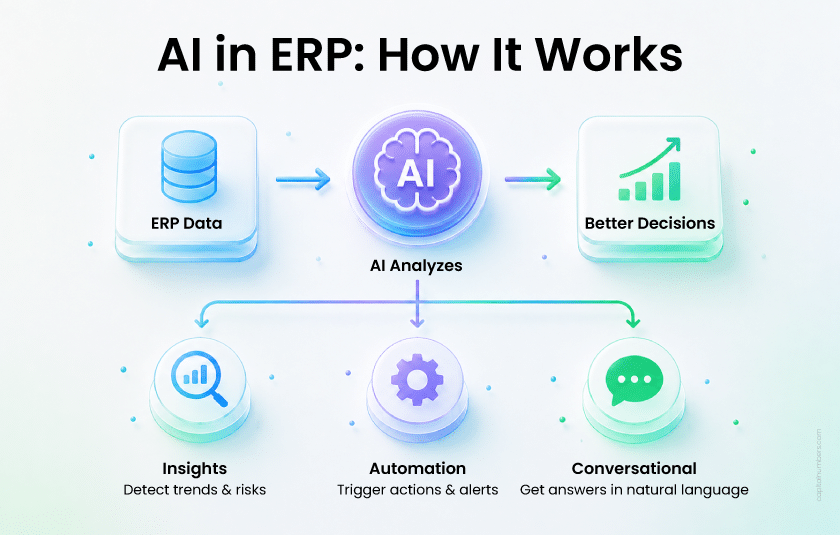
ERP systems are good at recording what has already happened. AI helps businesses use that data to predict what may happen next and act on it faster.
IDC predicted that by mid-2026, 60% of Global 2000 organizations would introduce new KPIs for AI-infused process redesign, targeting improvements of up to 45% in overall operational efficiency and employee productivity. The largest gains come from making ERP data easier to analyze and act on, rather than replacing the underlying platform.
Although this forecast focuses on large enterprises, the underlying principle is relevant to mid-market companies as well. The strongest results usually come from improving a defined financial or operational process rather than trying to transform the entire ERP environment at once.
AI can support ERP teams with demand forecasting, cash flow prediction, invoice anomaly detection, supplier risk alerts, procurement recommendations, inventory shortage prediction, financial report summaries, and natural language queries against ERP data.
There are three practical layers of AI in an ERP environment.
Insight Layer
Helps teams detect trends, risks, exceptions, and opportunities. AI can flag product categories at risk of stock shortages or identify vendors showing delivery-risk signals before they become supply chain problems.
Automation Layer
Triggers approvals, alerts, procurement actions, or exception workflows when specific thresholds are met, without waiting for a manual review cycle.
Conversational Layer
The conversational layer allows business users to ask questions directly instead of waiting for a report.
For example, a finance manager could ask:
“Show invoices above our materiality threshold where the purchase order value, goods receipt, and submitted invoice do not match. Group them by supplier and approval owner.”
This is more useful than a generic request for unusual expenses because it connects the question to specific ERP records, business rules, and actions.
How AI Connects to ERP Data
The integration approach depends on the type of information and action required. APIs are appropriate when AI needs current structured records. A data warehouse or analytics replica is better for analyzing several years of transactions. RAG is useful for retrieving policies, contracts, reports, and manuals. Controlled agents are appropriate when the workflow involves several steps or approved actions across systems.
For SAP, businesses may use embedded capabilities such as Joule or connect through approved SAP APIs, SAP Business Technology Platform, and integration services. For Oracle and NetSuite, a read-only API or data warehouse layer is often used to enable AI to analyze structured data without directly affecting live transactions. Microsoft Dynamics environments can use native Copilot features, Dataverse, Power Platform, or approved APIs.
For older or custom ERPs, middleware such as MuleSoft, Boomi, or Azure Integration Services can retrieve, transform, and pass approved data to the AI service. The ERP remains the system of record.
LC Waikiki provides a practical example. Its FinChat assistant was connected to Dynamics 365 Finance, enabling employees to retrieve account balances, invoice statuses, and cost center information in a conversational way. Microsoft reports that the solution reduced the time spent retrieving routine financial information by 30% to 50% and reduced errors by providing information directly from Dynamics 365.
This shows that the value does not necessarily come from replacing the ERP. It comes from making trusted ERP data easier to access and act on.
The key requirement is clean master data. Duplicate vendor records, inconsistent product codes, and incomplete transaction histories weaken predictions.
When ERP data is messy, AI does not hide the problem. It surfaces it faster.
How Does AI Integration Work in a Helpdesk

Helpdesk teams face a straightforward problem: ticket volume grows faster than team size. AI helps support agents respond faster, with better context and less manual effort, without removing the human role.
According to Zendesk’s 2026 CX Trends research, nearly 90% of CX trendsetters believe that 80% of customer issues will be resolved without human intervention within the next few years. This makes AI-assisted resolution, escalation controls, and smooth handoffs to human agents increasingly important.
AI can support helpdesk teams in four practical ways:
-
Intelligent Triage
AI classifies tickets, detects priority, reads sentiment, and routes requests to the right team, before a human opens the queue.
-
Agent Assist
Support agents receive ticket summaries, suggested replies, relevant knowledge base articles, and past customer context inside the helpdesk interface. They spend time on judgment, not research.
-
Self-Service Resolution
AI agents can resolve eligible requests across email, messaging, web, voice, and other connected channels. Unlike scripted bots, they can interpret requests, retrieve relevant knowledge, invoke approved tools, complete defined actions, and escalate exceptions to a person.
-
Pattern Detection
AI identifies recurring issues across tickets and flags them for product, operations, or customer success teams — turning reactive support data into proactive intelligence.
Here is what that looks like in practice.
A support agent opens a complaint. AI has already summarized the issue, surfaced the customer’s last three interactions, identified the likely cause based on similar resolved tickets, suggested a response, and flagged whether escalation criteria are met.
The agent reviews the information and acts. Without AI, gathering the same context could take three to five minutes per ticket.
For a team handling 1,000 tickets per week, even two minutes saved per ticket would return more than 30 hours of agent time. However, the savings only matter if the summaries are reliable and agents use them inside their existing workflow.
Platforms such as Zendesk, Freshdesk, ServiceNow, and Jira Service Management can support this through native AI features, marketplace applications, APIs, or custom assistants.
The safest starting point is ticket classification and routing. It improves speed without exposing customers directly to AI-generated responses.
For refunds, complaints, complex technical issues, and enterprise accounts, human review should remain in place.
Capital Numbers Insight: We have seen teams deploy a helpdesk AI assistant that technically worked — accurate classifications, relevant suggestions, but lived in a sidebar that agents never opened. Adoption was close to zero after six weeks. The model was fine. The placement was wrong. AI that sits outside the workflow does not get used.
Things to Get Right Before Integrating AI Into Enterprise Systems
The detailed CRM, ERP, and helpdesk sections already explain the importance of data, permissions, system access, and workflow placement. Before starting a project, businesses should therefore focus on four broader decisions.
-
Business Outcome
Choose one measurable operational problem. Establish the current baseline and define what improvement would justify expanding the integration. This might include preparation time, ticket handling time, forecast accuracy, exception-detection rates, or the number of manual steps removed.
-
Ownership and Adoption
Identify the business owner, technical owner, daily users, and people responsible for reviewing exceptions. Decide where the AI capability will appear in the existing workflow so employees do not need to open and manage another disconnected application.
-
Technical Approach
Determine whether the use case requires native platform features, API access, middleware, retrieval, a data warehouse, or an agent that can take approved actions. The simplest architecture that meets the business requirement is usually the best starting point.
-
Governance and Failure Handling
Define which data sources the AI can access, which actions require human approval, how outputs will be logged, and what happens when the system is uncertain or unavailable. Retention, data residency, model usage, and deletion requirements should also be agreed before deployment.
These decisions create a practical foundation without repeating the same data-quality, access-control, and workflow guidance in every section.
Where Should Businesses Start With Enterprise AI Integration?
The best AI integrations start small. They prove value in one workflow, then expand based on what they learn.
| Phase | Focus | What It Means | Goal |
|---|---|---|---|
| Phase 1 | One system, one use case | Start with a repetitive workflow in CRM, ERP, or helpdesk | Prove value safely |
| Phase 2 | Real user pilot | Test with real users and real data | Check accuracy, trust, and adoption |
| Phase 3 | Expand within the same system | Add related use cases in the same platform | Build repeatable value |
| Phase 4 | Cross-system intelligence | Connect CRM, ERP, helpdesk, and internal tools | Create a broader business context |
Start With One Workflow, Not a Transformation
The question most businesses are really asking is not ‘can we use AI?’ — it is ‘where do we start without making things worse?’
The answer is almost always the same: pick one workflow that is already costing your team time. Connect it to the right data. Keep access rules clear. Measure the result before expanding.
Each section in this guide points to a practical first use case: lead qualification in CRM, invoice anomaly detection in ERP, and ticket classification in helpdesk. Any of these can be running within weeks. What scales from there depends on what you learn — which data was cleaner than expected, which outputs needed more human review, which teams adopted quickly, and which did not.
That feedback loop is how enterprise AI integration actually works in practice. Not as a single transformation project, but as a series of small improvements that compound.
Want to add AI to your existing CRM, ERP, or helpdesk without disrupting current operations? Capital Numbers can help you plan and implement a secure, practical, and scalable AI integration roadmap. Schedule a call today →
Frequently Asked Questions
1. Can AI be added to an existing CRM without replacing it?
Yes. AI can be integrated into an existing CRM via APIs, automation workflows, native AI features, or custom AI assistants. The CRM remains the primary customer data source, while AI supports lead scoring, customer insights, follow-up drafts, sales forecasting, churn alerts, and next-step recommendations.
2. How can AI be integrated into an ERP system?
AI can be integrated into an ERP through APIs, secure data pipelines, workflow automation, or built-in AI features such as SAP Joule or Microsoft Copilot for Dynamics. It can support demand forecasting, cash flow prediction, invoice anomaly detection, supplier risk alerts, and faster ERP data search. Data quality and access rules should be reviewed before integration begins.
3. What is the safest way to use AI in a helpdesk?
Start with internal tasks such as ticket classification, routing, and priority tagging. AI can also help agents draft replies, but human review should remain in place for refunds, complaints, escalations, and sensitive customer issues. This keeps support faster while protecting service quality and customer trust.
4. What should businesses check before starting AI integration?
Before starting, check data quality, API access, user permissions, security rules, workflow gaps, and compliance needs. AI works better when the business use case is clear, the data is clean, and access rules are well defined. Our developers usually review these areas first so the integration is practical, secure, and easier to scale.
5. How long does AI integration take?
Built-in AI features or simple automation can be live within weeks. Custom API-based or cross-system integrations typically need more planning, testing, and governance — often two to four months for a well-scoped pilot. Many businesses start with a focused pilot, then expand after seeing clear, measurable value.


 Web Development
 Cloud Engineering
 Mobile App Development
 AI/ML/GenAI
 E-commerce
 Software Development
 UI/UX
UI/UX QA
QA Dedicated Teams