
AI Agents on AWS: 5 Practical Use Cases for Businesses in 2026
Table of Contents
Executive Summary
- AI agents on AWS go beyond basic chatbots by helping businesses support work, automate tasks, and improve decisions.
- Amazon Bedrock helps businesses build agents with model access, knowledge bases, actions, and orchestration.
- This blog covers five practical agent types businesses can deploy in 2026.
- Each one maps to a real business function, from customer support and internal knowledge to workflow automation, software delivery, and analytics.
- The goal is not just to experiment with AI, but to use it where it can create clear business value.
AI agents on AWS are becoming a practical way for businesses to improve customer support, automate repetitive work, speed up internal processes, and get faster answers from business data. In 2026, the real value is not in adding AI just to keep up. It is in using agents that support real workflows, connect with existing systems, and deliver measurable business results. That is why more teams are exploring practical AI agent use cases, from enterprise AI agents for internal operations to RAG agents for knowledge access and workflow automation on AWS.
That shift is why businesses are looking at agent use cases more seriously. Instead of asking what AI can do in theory, leaders are asking how building useful AI systems can save time, reduce delays, and improve decisions in day-to-day operations. This blog looks at five practical AI agent types on AWS that businesses can deploy for real value.
What Are AI Agents on AWS?
AI agents on AWS are systems that can understand requests, gather the right context, and work with connected tools or systems to help complete a task. They are designed to support work, not just generate replies.
How do AI agents work on AWS?
In simple terms, an AI agent receives a request, finds the appropriate context, and decides what to do next. That may include pulling information from a knowledge base, checking business data, following task logic, or connecting with another system. On AWS, that makes it possible to build agents that do more than respond. They can support real work across customer support, research, workflows, software delivery, and analytics.
How are AI agents different from chatbots?
A chatbot mainly answers questions. An AI agent goes further. It can retrieve data, follow steps, connect with other systems, and help move work forward. That is what makes AI agents more useful for real business tasks like support, research, workflow automation, and analytics.
What Makes AWS the Right Platform for AI Agents in 2026?
AWS works well for businesses that want to move beyond AI testing and start using agents in real work. In 2026, companies are not just looking for something impressive in a demo. They want something that fits into daily operations, works with existing systems, and can scale as business needs grow.
- Model choice is a real advantage:
Amazon Bedrock gives teams access to different models, so they can choose the one that best fits the task instead of relying on a single option for everything. That matters when different use cases have different needs around cost, speed, or output quality. - Control matters just as much as capability:
Businesses need security, governance, and visibility before they can trust agents in important workflows. That is especially important for enterprise AI agent use cases, where agents may interact with internal systems, business data, or approval steps. - It fits naturally into existing AWS environments:
If a company already runs applications, data, and infrastructure on AWS, it becomes easier to connect agents to the tools and workflows already in place. - Businesses can move at their own pace:
Some teams want managed services to launch faster. Others want more customization and control. AWS supports both, making it useful for large organizations as well as teams working on AI for startups.
The 5 Practical Agent Types Businesses Can Deploy on AWS
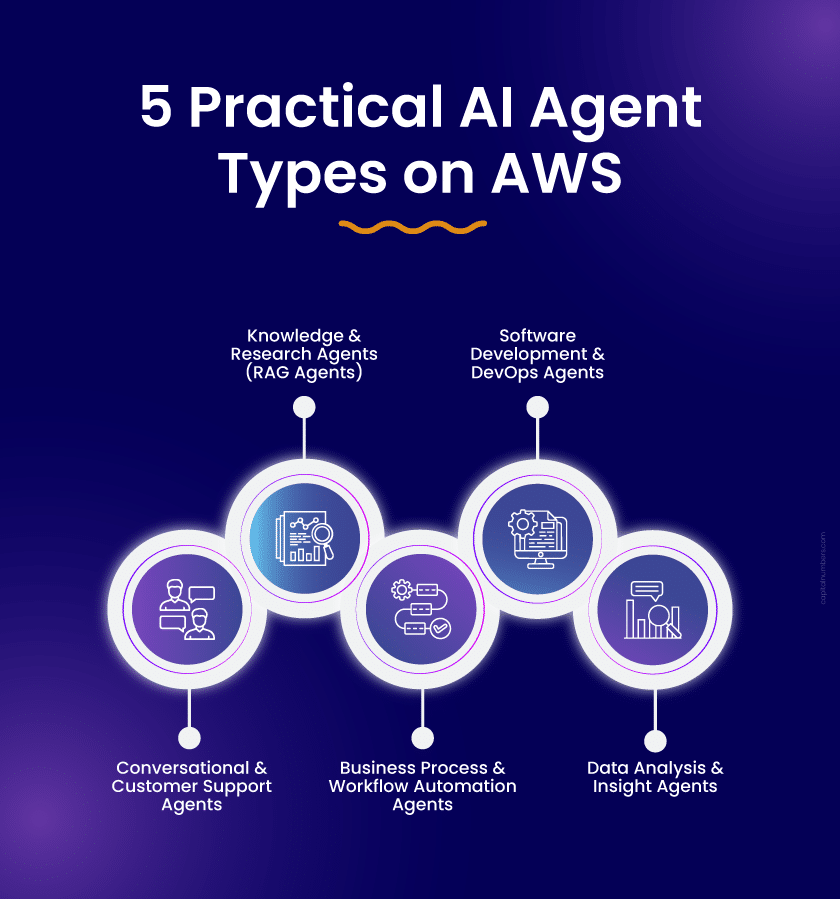
Not every business needs the same kind of AI agent. The best starting point depends on where work slows down, where teams repeat the same decisions, and where better speed or insight can create real value. In 2026, the strongest AI agent use cases are not broad experiments. They are focused deployments tied to a real workflow, a real team need, and a measurable outcome.
1. Conversational & Customer Support Agents
What this agent does
This type of AWS AI agent handles customer queries across chat or voice. It can answer common questions, resolve routine issues, pull in account or order details, and escalate more complex cases with the right context already attached.
Example use case
A mid-sized e-commerce company deploys a customer support agent for order tracking, return requests, and refund status. Customers get quick answers at any time, while more complex cases move to a human agent with the conversation history and key details already in place.
AWS services behind it
- Amazon Bedrock Agents
- Amazon Lex
- Amazon Connect
- Amazon DynamoDB
Business value
- Lower support workload
- Faster response and resolution times
- More consistent customer service
- Better use of human support teams
Best fit for
This is a strong fit for retail, financial services, telecom, SaaS, and any business handling a high volume of repetitive customer queries.
2. Knowledge & Research Agents (RAG Agents)
What this agent does
These agents help teams find accurate, context-specific answers from internal documents, policies, contracts, and other business knowledge. Instead of relying only on what the model already knows, they retrieve information from approved sources based on indexed business data and connected systems.
Example use case
A legal or compliance team uses a knowledge agent grounded in internal policies and documents, regulatory documents, and contracts. Instead of spending hours searching manually, staff ask a question and get a grounded answer with the right supporting context.
AWS services behind it
- Amazon Bedrock Knowledge Bases
- Amazon S3
- Amazon OpenSearch Serverless or Amazon Kendra GenAI index
- AWS Lambda, where needed
Business value
- Less time spent searching for information
- Faster access to trusted answers
- Fewer mistakes caused by missed or outdated documents
- Better knowledge sharing across teams
Best fit for
This works especially well for professional services firms, legal teams, healthcare providers, and enterprises with large internal knowledge bases that are hard to navigate.
3. Business Process & Workflow Automation Agents
What this agent does
This type of agent takes over multi-step business processes that usually involve several systems, approvals, and handoffs. It does not just automate one small task. It helps coordinate the full workflow from start to finish.
On AWS, these agents usually combine Bedrock for orchestration with action groups, Lambda, and Step Functions to call systems and manage task flow.
Example use case
An HR team uses a workflow automation agent for employee onboarding. Once a new hire is confirmed, the agent triggers IT setup, sends onboarding documents, schedules orientation, and notifies the right managers. Work that once moved slowly across teams can move much faster and with fewer manual follow-ups. In more sensitive workflows, the agent can also stop at approval points or flag exceptions for human review, rather than automatically pushing every action through.
AWS services behind it
- Amazon Bedrock Agents
- AWS Step Functions
- AWS Lambda
- Amazon SNS
- Amazon RDS
Business value
- Faster process completion
- Fewer manual handoffs
- Lower operational overhead
- Better visibility across workflows
Best fit for
This is a strong option for operations leaders, HR teams, finance teams, and businesses running processes that depend on multiple systems, approvals, or cross-functional coordination.
4. Software Development & DevOps Agents
What this agent does
These agents support engineering teams across the software delivery lifecycle. They can help with code generation, code review, test creation, troubleshooting, upgrade guidance, and security scanning. Rather than acting as a fully autonomous release manager, they work best as developer assist tools that help teams move faster and improve code quality.
Example use case
A product team uses a development agent inside its existing workflow. As developers write code, the agent reviews it, suggests improvements, helps generate tests, and flags security concerns before release. That helps teams move faster without lowering quality.
AWS services behind it
- Amazon Q Developer
- AWS CodePipeline
- AWS CodeBuild
- Amazon Inspector
- AWS Lambda
Business value
- Faster development cycles
- Less time spent on repetitive engineering work
- Better code quality and testing support
- Stronger development productivity
Best fit for
This is a good fit for CTOs, engineering leads, startups scaling quickly, and enterprises managing large or older codebases that need ongoing modernization.
5. Data Analysis & Insight Agents
What this agent does
These agents connect to business data, run analysis, surface anomalies, and generate insights when needed. Instead of waiting for reports or dashboards to be manually prepared, teams can ask questions, get faster data-backed answers, and respond sooner when something changes.
Example use case
A retail business uses a data agent to monitor sales performance across locations. When performance drops in a region, the agent flags the change, highlights the likely cause based on available patterns, and sends a summary to the appropriate manager before the problem escalates.
AWS services behind it
- Amazon Bedrock Agents
- Amazon Athena
- Amazon QuickSight
- AWS Glue
- Amazon S3
Business value
- Faster access to business insight
- Earlier visibility into unusual changes
- Quicker decision-making
- Less delay between data and action
Best fit for
This is especially useful for business leaders, operations managers, sales teams, and marketing teams that rely on data but do not always have the time or capacity to analyze it quickly.
Which AI Agent on AWS Should Your Business Start with?
The right starting point depends on the business problem you want to solve first. Some agents improve customer support. Others help teams find information faster, automate internal work, speed up software delivery, or turn data into useful insight. Use this comparison to see which agent type best matches your current business need.
| AI Agent Type on AWS | Key AWS Services | Best Use |
|---|---|---|
| Conversational & Customer Support Agents | Amazon Bedrock, Amazon Lex, Amazon Connect | 24/7 support, self-service, agent assist |
| Knowledge & Research Agents | Amazon Bedrock Knowledge Bases, Amazon S3, Amazon OpenSearch Serverless, or Amazon Kendra GenAI index, AWS Lambda, where needed | Internal search, policy lookup, research support |
| Business Process & Workflow Automation Agents | Amazon Bedrock Agents, AWS Lambda, AWS Step Functions | Workflow automation, approvals, repetitive tasks |
| Software Development & DevOps Agents | Amazon Q Developer | Code generation, troubleshooting, reviews, and developer productivity |
| Data Analytics & Insight Agents | Amazon Bedrock, Amazon Athena, Amazon QuickSight | Data analysis, insight generation, anomaly detection |
How do you choose the right AI agent for your business?
The best place to start is not with the technology. It is with the part of the business that feels slow, repetitive, or harder than it should be. That is usually where an AI agent can make a clear difference first. The goal is to choose a use case that saves time, removes delays, or helps teams make faster decisions.
A simple way to think about it is to ask:
- Where is your biggest operational bottleneck?
Look for work that regularly slows teams down. - Where does your team spend too much time on repetitive decisions?
These are often some of the most practical AI agent use cases. - Where does slow access to data lead to missed revenue, delays, or customer frustration?
That is often where the business impact is easiest to measure.
Start with one high-ROI use case, not a major change across the business.
Which AI Agent Should You Deploy First?
The best results usually come from starting with the agent that solves a real business problem simply and safely. For many businesses, that first step could be customer support, internal knowledge, workflow automation, software productivity, or analytics. The key is to start where work feels slow, repetitive, or difficult to manage, and where the business value is easy to see.
If you are deciding which AI agent use case makes the most sense to start with, get in touch with our professionals. Our developers can help you identify the right fit for your business, connect it to your workflows, and plan the next steps practically.
FAQs on AI Agents and AWS
1. What are AI agents on AWS?
AI agents on AWS are AI systems that can understand a request, find the right information, and work with connected tools or systems to help complete a task. They are built to support real work, not just reply to prompts.
2. How are AI agents different from chatbots?
A chatbot mostly answers questions. An AI agent can do more. It can pull data, follow steps, connect with other systems, and help move work forward. That is why agents are more useful for real business tasks.
3. What is Amazon Bedrock, and why does it matter for AI agents?
Amazon Bedrock is AWS’s service for building generative AI applications and agents. It matters because it helps businesses build and use AI without putting every piece together from scratch.
4. How long does it take to deploy an AI agent on AWS?
It depends on the use case. A simple internal agent may take a few weeks to test. A more advanced setup can take longer if it needs integrations, approvals, or security checks.
5. How much does it cost to build an AI agent on AWS?
The cost of building an AI agent on AWS varies based on what the agent needs to do, which AWS services it uses, and how heavily it is used. A simple internal assistant may be relatively lightweight to launch, while a production-grade agent with business system integrations, knowledge retrieval, and workflow automation will cost more. The main cost drivers usually include Amazon Bedrock usage, knowledge base or vector storage, orchestration, and connected AWS services. The best approach is to begin with one high-value use case, measure usage and outcomes, and then scale based on proven ROI.


 Web Development
 Cloud Engineering
 Mobile App Development
 AI/ML/GenAI
 E-commerce
 Software Development
 UI/UX
UI/UX QA
QA Dedicated Teams