
AI-Powered Websites: The New Standard for 2026 (And Why You Can't Wait)

Technical Architect
24th December, 2025
You’re paying for traffic - ads, campaigns, SEO - but your website is still letting opportunities slip away. People click, skim for a few seconds, then disappear. And when acquisition costs keep climbing, a “static brochure” site becomes a silent growth killer.
To compete in 2026, your website must start adapting today. Not next quarter. Not after the next redesign. Because the brands pulling ahead are already using AI to read intent in real time, personalize what visitors see, answer questions instantly, and guide people to the next best step, without manual effort from their teams.
In this blog, you’ll learn what an AI-powered website really is, where it drives measurable results, and how to get started in focused steps, whether you build it in-house or partner with an AI development company to move faster and avoid costly trial and error.
What Exactly Is an “AI-Powered Website”?
An AI-powered website is still a normal website on the surface. Your pages, menus, and branding are all there. The difference is what happens underneath.
This kind of website adds an intelligence layer that helps your site understand visitors, respond in the moment, and improve over time.
Think of it as a site with four core abilities:
- Understands Behavior and Intent
It notices what people click, how long they stay, what they ignore, and where they drop off to sense what they’re really looking for. - Adapts Content, Offers, and Journeys
Headlines, recommendations, and page flows can change based on who is visiting and what stage they’re at. - Automates Routine Interactions
Chats, FAQs, lead capture, and simple follow-ups can run automatically in the background. - Learns and Improves over Time
As more visitors interact, it gets better at predicting what will work and where to guide them.
One thing most teams miss - AI is useless without clean data. If your analytics tracking is messy, your CRM data is incomplete, or your product/content data is inconsistent, AI will personalize poorly and surface the wrong insights. That’s why the strongest AI-powered websites start with a clean data foundation behind the scenes.
Core AI Capabilities Your Website Can Use
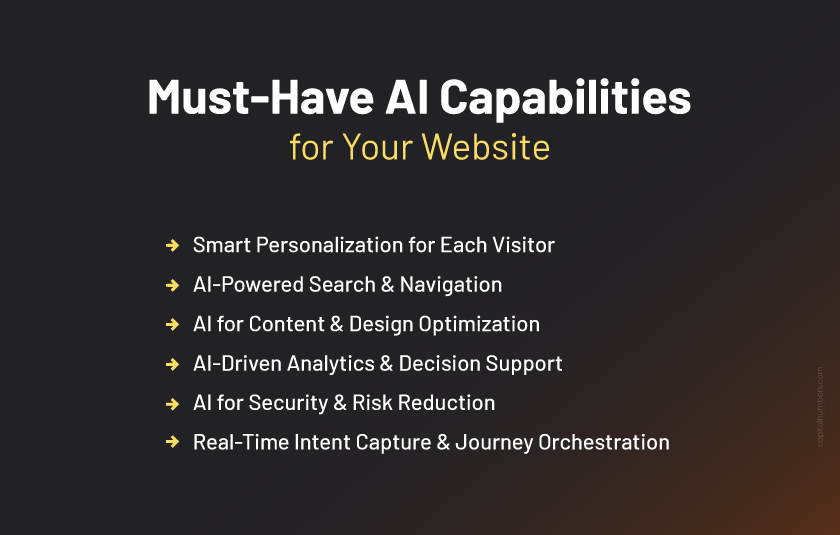
An AI-driven website doesn’t “add AI” for decoration. It improves the parts of your site where people hesitate, get confused, or drop off. These are the most practical capabilities to focus on.
1. Smart Personalization for Each Visitor
Right now, your website can behave like a salesperson who remembers every visitor.
It can:
- Show different headlines, offers, and proof points based on industry, location, or traffic source
- Highlight relevant case studies or testimonials, depending on who is browsing
- Treat new visitors with simple “who we are” messaging, and returning visitors with stronger, action-focused prompts
This level of AI-driven custom experience helps each person feel like the site was built for them, without your team manually creating dozens of versions.
2. AI-Powered Search & Navigation
Many visitors don’t want to click through menus. They want answers.
AI-powered search will allow people to:
- Use natural language, like “I need support for my invoice” or “best plan for a small marketing agency”
- Find answers across your entire ecosystem - products, services, FAQs, blogs, documentation - from one search bar
- Get smart suggestions and follow-up questions when they’re not sure what to look for
This reduces frustration and keeps users moving instead of bouncing.
3. AI for Content & Design Optimization
Instead of redesigning your site every few years, AI will help you improve it continuously.
Your website will be able to:
- Test multiple versions of headlines, images, CTAs, and layouts automatically
- Identify which combinations lead to more clicks, form fills, or checkouts
- Adjust content blocks and page sections over time based on real performance
You don’t have to guess what works. AI-driven web development will show you what actually moves visitors to take the next step.
4. AI-Driven Analytics & Decision Support
Dashboards will become easier to understand and more predictive.
AI can:
- Translate complex data into plain-English summaries like “Your demo requests dropped on mobile last week”
- Highlight which channels bring the highest-value leads, not just the most clicks
- Send predictive alerts when a campaign, landing page, or funnel looks likely to underperform
Instead of hunting for insights, your website will actively surface them for you.
5. AI for Security & Risk Reduction
AI can help protect your site and your data by spotting patterns humans miss.
It will:
- Detect bots, fake signups, and abusive behavior before they flood your forms or systems
- Flag unusual login patterns, payment attempts, or location changes
- Learn from previous attacks or fraud attempts and tighten defenses automatically
This means cleaner data, fewer headaches for your team, and more trust for your customers - all built into the same AI-powered website that’s helping you sell.
6. Real-Time Intent Capture & Journey Orchestration
This is where AI-powered websites feel truly different.
AI can read live signals such as:
- Pages viewed, scroll depth, time on key sections
- Repeat visits, traffic source, device, and navigation patterns
Then it can trigger the right next step automatically:
- If someone is stuck on pricing, show a clearer breakdown or relevant FAQs
- If someone reads multiple case studies, offer a “book a consult” path
- If someone shows early interest, ask 1–2 smart questions to capture context (use case, timeline, budget range)
- Route them to self-serve answers, the best CTA, or the right team
The result is fewer drop-offs and better lead context for your CRM.
Where AI-Powered Websites Shine: Use Cases by Business Type
Different business models use AI in different ways. The key is choosing the right capabilities that enhance your business and deliver the outcomes you need. Here’s how AI can be applied to create real business value.
1. Business Type: E-commerce
High-impact AI features:
- Product recommendations, smart search, AI chat for product questions, cart-recovery prompts
What it delivers:
- Higher order value, fewer abandoned carts, faster product discovery
Capital Numbers’ Use Case:
We helped an e-commerce brand improve on-site discovery by implementing smart search and recommendations. Customers found products faster, and the business saw more add-to-cart actions and fewer “dead-end” sessions.
2. Business Type: Healthcare
High-impact AI features:
- Enquiry-qualification bot, AI-assisted follow-ups
What it delivers:
- Better enquiry quality, cleaner CRM/patient-intake data
Capital Numbers’ Use Case:
For a healthcare provider, we built an enquiry bot that asked 3–4 key questions (service needed, urgency, preferred location, insurance/self-pay) and routed requests to the right team. They saw fewer irrelevant enquiries and more appointment-ready calls.
3. Business Type: SaaS / Tech Product
High-impact AI features:
- Onboarding assistant, in-app help, smart tips based on what users do
What it delivers:
- Fewer cancellations, faster activation, more upgrades
Capital Numbers’ Use Case:
We recently supported a SaaS product by deploying an onboarding assistant that answered “how do I…?” questions inside the product and guided users through setup. It reduced repetitive support requests and helped users get value from the product faster.
4. Business Type: Education / Content Businesses
High-impact AI features:
- Personalized content paths, AI tutor / Q&A assistant, recommendations by level/interest
What it delivers:
- Higher engagement, longer sessions, better completion rates
Capital Numbers’ Use Case:
We helped a content-heavy platform introduce personalized learning/content paths based on what users consumed and where they dropped off. Users reached relevant pages faster, and session depth improved as the experience became less “browse and guess.”
Tools and Frameworks for AI in Web Development
As a business owner, you don’t need to know every line of code behind AI-driven web development. But knowing the types of tools your team or agency might use helps you ask better questions and make better decisions. Here’s a simple breakdown.
1. Low-Code / No-Code AI
These are tools you can switch on without rebuilding your site.
Examples:
- Chatbots and support tools
- Personalization and recommendation apps for Shopify/WooCommerce/WordPress
- Website platforms with an AI helper for copy, layout, or basic tweaks
Best when:
- You want quick wins and simple experiments
- You don’t need deep integrations
- Your use case is straightforward (FAQs, basic lead capture, simple personalization)
Trade-off: Useful, but limited. Many tools work the same way for everyone.
2. Custom AI Engineering
This is where AI becomes part of your website’s core system.
It typically means:
- Connecting AI to your approved business content (docs, policies, knowledge base)
- Making it work with your tools (CRM, support, analytics)
- Adding guardrails so it stays accurate, secure, and on-brand
Best when:
- You care about lead quality, conversions, support reduction, and reliability
- You need AI to follow rules, use the right data, and stay consistent
- You want something competitors can’t copy by installing the same plugin
A Simple Way to Decide
- If you want to test fast, start with low-code/no-code tools.
- If you want AI to become a competitive advantage, invest in custom engineering.
Budget & ROI for AI-powered Web Development
Instead of seeing an AI-powered website as just another tech expense, treat it as you would any growth initiative, something you fund with the expectation of clear, measurable returns.
Your investment usually has three parts:
- One-time setup
Strategy, design, build, AI integrations, and basic training for your team. - Monthly tools/subscriptions
Chatbots, analytics, personalization engines, and cloud AI services that power the experience. - Ongoing optimization and tuning
Tweaking journeys, improving prompts, refining segments, and testing new ideas as you learn what works.
To keep it simple, you can think of ROI like this:
|
Area |
Example Impact |
|---|---|
|
Revenue |
+10–20% conversion from existing traffic |
|
Costs |
Reduced support load and repetitive tasks |
|
Time |
Team focuses on higher-value initiatives |
You may not hit these exact numbers, but this is the direction you’re aiming for: more value from the same or slightly higher spend.
So instead of only asking, “What does it cost?”, start asking, “What return would make this a good decision for us?” Once you’re clear on that, it becomes much easier to decide how far to go with AI and where to start.
Future of Web Development with AI: Will AI Replace Web Developers?
When you look at web development trends, AI will be everywhere, but it will not replace web developers. It will change how they work and what you expect from your website.
1. What Can AI Already Do in Web Development?
Modern AI web development tools are good at the “heavy lifting” work. They can:
- Generate starter layouts, page structures, and components in seconds
- Suggest fixes for performance, SEO, and accessibility
- Automate repetitive coding, refactoring, and parts of testing
To keep it simple, you can think of ROI like this:
You may not hit these exact numbers, but this is the direction you’re aiming for: more value from the same or slightly higher spend.
So instead of only asking, “What does it cost?”, start asking, “What return would make this a good decision for us?” Once you’re clear on that, it becomes much easier to decide how far to go with AI and where to start.
2. Why Do Developers and Good Partners Still Matter?
Even with powerful AI in website creation, humans stay in charge of the important decisions. You still need experts for web development services to:
- Connect the website strategy to real business goals
- Shape journeys and messaging for your audience, not a generic template
- Design secure, scalable architectures and integrations with your systems
- Set guardrails so AI responds in the right way and protects your brand
3. How This Changes Your Role as a Business Owner
Your role shifts from “approving pages” to setting direction:
- Define clear outcomes: more leads, higher CLV, lower churn
- Decide where AI should help first on your site
- Work with partners who understand both your business and AI-driven UX/UI design
The real advantage goes to owners who combine human expertise with building websites with Artificial Intelligence, not to those who chase tools without a plan
Bottom Line
If your website still behaves the same way for every visitor, you’re already behind, and the gap widens every month you wait. The next era of web competition won’t be won by “prettier” sites. It will be won by websites that adapt, respond, and improve continuously.
Start small, but start now: pick 2–3 revenue-driving pages, identify where users drop off, choose one AI use case (chatbot, personalization, or smart search), and run a 60–90 day test with a clear goal. What works gets scaled? What doesn’t get fixed fast?
Want to move quickly without guessing? Talk to our team. We’ll help you identify the highest-impact starting point and build the AI-powered foundation your website needs to stay competitive as the market shifts. Get in touch with us today!

Shubendu BiswasTechnical Architect
A seasoned software engineer with a deep expertise in Generative AI, Natural Language Processing (NLP), and Machine Learning. His experience extends to successfully deploying ML models into production, ensuring real-world impact. Shubendu is proficient in Django Rest Framework and Flask REST APIs, demonstrating his skills in building robust and scalable web applications.