
What’s New in C# 14: Real-World Features You’ll Actually Use
Table of Contents
C# is a modern, object-oriented programming language by Microsoft that powers web apps, APIs, desktop software, cloud services, and even games. Over time, it has evolved to be more practical, making everyday code easier to write, read, and maintain. Now, with C# 14, the language continues its trend of improvement.
C# 14 ships with the .NET 10 SDK. These features focus on changes you will actually notice: fewer extra null checks, cleaner properties when you need a bit of logic, and extensions that look and behave more like real API members. There are also updates that make span-based, performance-friendly code easier to use without adding complexity. Let’s take a look at what’s new in C# 14, why it matters in real projects, and what you should check before upgrading.
Why Upgrade to C# 14?
Upgrading from C# 13, C# 12, or older versions is useful because it makes everyday development smoother. The C# 14 new features focus on small improvements that add up in real projects.
Here are the key reasons to upgrade to C# 14:
-
Fewer null checks
Less if (x != null) code means cleaner flow and fewer mistakes.
-
Cleaner APIs
Extensions feel more like real members, so shared helpers are easier to use and maintain.
-
Better performance without risky code
Span updates can reduce allocations on hot paths without resorting to unsafe tricks.
-
Easier property refactors with field
You can keep auto-properties simple and add small logic later without rewriting everything.
When Not to Rush?
If you’re not ready for the .NET 10 language updates across your apps, don’t upgrade everything at once. Start with one small service, validate dependencies, then expand gradually.
What Are the Core Features of C# 14?
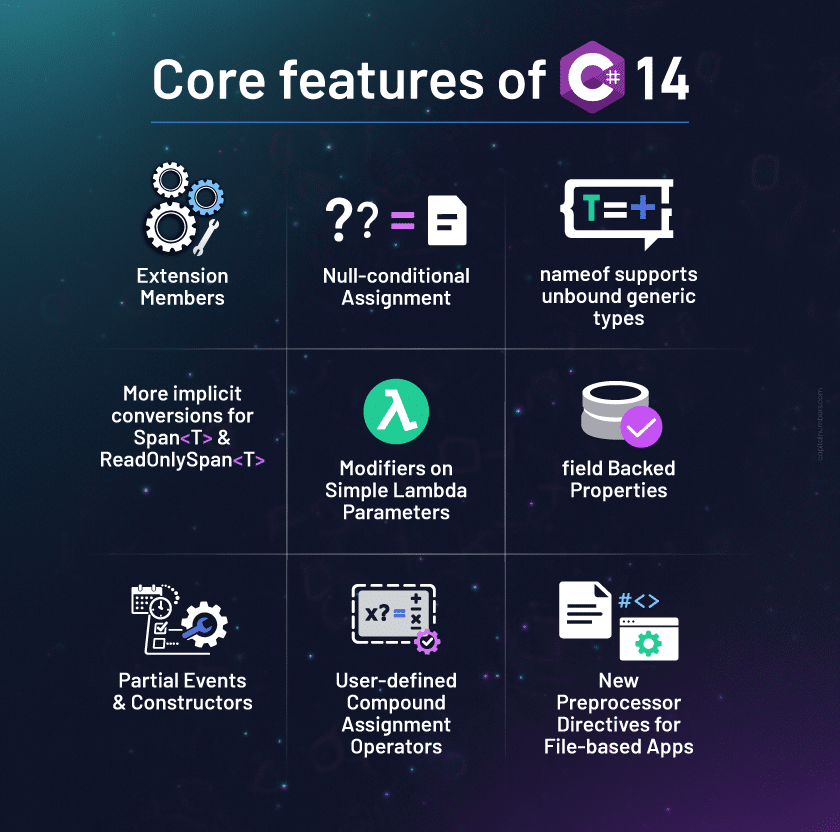
Once you have decided to upgrade to the latest version of the programming language, you may be wondering what’s new in C# 14. Here are the chief features to know about:
1. Extension Members
-
- What is it?
C# used to let you add extension methods only. C# 14 expands that idea, allowing extensions to look and behave more like real members. You can expose extension properties, add static-style extension members, and even define operators through extensions. - Why does it matter?
This makes your helper APIs feel more natural to use. Instead of looking for SomeUtility.DoThing(x), you can expose clean, discoverable members right where C# developers expect them (via IntelliSense). It also reduces the “huge extensions file” problem that grows over time. - Where you will use it (real-world)
- Shared libraries used across multiple services/apps
- Domain helper APIs (money, dates, IDs, formatting rules)
- Adding convenience members to types you don’t own (collections, strings, built-in types)
- Example
- What is it?
 // The new C# 14 way: defining an extension directly on the type
public extension StringExtensions for string
{
    // This is now a property, not just a method!
    public bool IsEmpty => string.IsNullOrEmpty(this);

    public string ToTitleCase() => Thread.CurrentThread.CurrentCulture.TextInfo.ToTitleCase(this);
}

// Usage in code:
// string myText = "hello world";
// bool check = myText.IsEmpty; // Look, no parentheses!
- Caution:
Naming conflicts and discoverability issues: extension members can make APIs feel “built-in,” so teams should adopt naming and placement conventions (e.g., keep them in domain-specific namespaces, avoid polluting common types).
2. Null-conditional Assignment (?. / ?[] on the left side)
- What is it?
You can now assign to a property or indexer only when the object exists, without writing an if block. In simple terms: “update it if it’s there; otherwise do nothing.” - Why does it matter?
It removes much of the repetitive guard code. That means:- Fewer nested blocks
- Less branching to scan while reading
- Fewer “oops, forgot the null check” bugs
Also, the right-hand side runs only when needed, helping avoid accidental extra work.
- Where you will use it (real-world)
- DTO (Data Transfer Object) mapping (optional nested objects)
- Updating optional settings/config values
- Cache updates when the cache might not be initialized
- UI/view-model updates where objects can be null during loading
- Example
user?.LastLoginUtc = DateTime.UtcNow; items?[index] = value; - Clarification
- The right-hand side (RHS) is only evaluated when the left side is not null.
- Increment/decrement isn’t supported (e.g., a?.b++ fails).
3. nameof supports unbound generic types (List<>)
-
- What is it?
You can use nameof(List<>) to get the generic type name without picking a placeholder type like List<int>.For example, nameof(List<>) will now simply return the string “List”, making it much easier to log generic types without error.
- Why does it matter?
It keeps logs, exception messages, and diagnostic strings clean and consistent. This is especially helpful in libraries and frameworks where you talk about types generically and don’t want to hardcode names. - Where you will use it (real-world)
- Logging/telemetry (“handler = List”, “cache = Dictionary”)
- Guard clauses and exception messages
- Analyzer/tooling code
- Library development where generic type names show up often
- Example
- What is it?
throw new InvalidOperationException($"{nameof(List<>)} cannot be used here.");
4. More implicit conversions for Span<T> / ReadOnlySpan<T>
- What is it?
C# 14 improves how spans fit into the language. Conversions between arrays, spans, and read-only spans become smoother, so you don’t need as many explicit calls (like AsSpan()) to pass data around. - Why does it matter?
Spans are great for performance because they enable you to work with slices of data without additional allocations. The problem has been ergonomics, code sometimes felt “fussy.” This update makes span-based code easier to write and read, making performance improvements more accessible. - Where you will use it (real-world)
- Parsing CSV/JSON-like formats
- Text processing and tokenizing
- High-throughput endpoints (less allocation = less GC pressure)
- Buffer-heavy utilities (stream processing, protocol parsing)
- Before After Example
// Before: Using AsSpan() var span = input.AsSpan(); // After: Direct support for span-based code ReadOnlySpan span = input; - Important Note:
As more conversions are allowed, overload resolution can change. Run tests in parsing/tokenizing/hot-path utilities; watch for changed overload picks.
5. Modifiers on Simple Lambda Parameters (out, ref, in, scoped, etc.)
- What is it?
You can apply modifiers like out or ref to lambda parameters without writing full parameter types. That means lambdas stay compact even when you need special parameter behavior. - Why does it matter?
It is a small change, but it improves readability, especially in functional-style code where lambdas are everywhere. You don’t have to “inflate” a lambda just to support out/ref. - Where you will use it (real-world)
- TryParse-style delegate patterns
- Performance-sensitive helpers where ref/in matters
- Low-allocation utilities in tight loops
- APIs that accept delegates for processing/validation
- Example
Func<int, int,="" bool=""> tryParse = (in int value, out bool result) => { result = value > 0; return result; }; </int,> - Key Constraint
This is most useful when the target delegate already defines the parameter passing mode, and the compiler can infer the types.
6. field Backed Properties (the field keyword)
- What is it?
You can add logic in a property getter/setter while still using the compiler-generated backing field. You don’t need to create a separate _name field just to add a small rule. - Why does it matter?
This is one of the most practical upgrades:- Keep properties clean
- Add small rules later without refactoring half the file
- Avoid “field clutter” across models and DTOs
- It’s especially useful in large codebases where small property changes occur frequently.
- Where you will use it (real-world)
- Null guards (value ?? “”)
- Trimming and normalization (Trim, ToLowerInvariant)
- Clamping ranges (min/max values)
- Simple invariants (never allow negative numbers)
- Example
Before (The old way):private string _name; // We had to manually create this "backing field" public string Name { get => _name; set => _name = value?.Trim() ?? ""; }After (The C# 14 way):
public string Name {
    get => field; // 'field' is automatically created for you!
    set => field = value?.Trim() ?? "";
}
7. Partial Events and Constructors
- What is it?
C# developers can split constructors and events across partial declarations, so part of the implementation can live in one file and the rest in another. - Why does it matter?
This helps when code is split between:- Generated code (source generators)
- Hand-written code
Instead of awkward “do not edit” blocks or messy merge points, you can keep each part clean and separate.
- Where you will use it (real-world)
- Source-generated models/DTOs
- Large partial types where setup lives in one place and logic in another
- Projects that rely on code generation for boilerplate
- Example
// Generated code
public partial class MyClass
{
    public event EventHandler OnEvent;
}

// Hand-written code
public partial class MyClass
{
    public void RaiseEvent() => OnEvent?.Invoke(this, EventArgs.Empty);
}
8. User-defined Compound Assignment Operators (+=, etc.)
-
- What is it?
This feature of C# 14 allows you to define how compound assignments behave for your types, including supporting in-place updates when that’s the right behavior. - Why does it matter?
For certain types, this can:- Reduce allocations
- Make updates clearer (total += itemCost)
- Keep performance-heavy code simpler
- It’s most valuable when you’re building types that behave like numbers/counters.
- Where you will use it (real-world)
- Counters and metrics aggregation
- Custom numeric/value containers
- Performance-heavy loops updating totals frequently
- Example
- What is it?
public class Metric
{
    private int total;

    public static Metric operator+=(Metric m, int value)
    {
        m.total += value;
        return m;
    }
}
9. New Preprocessor Directives for File-based Apps
- What is it?
C# 14 adds directives meant for file-based workflows, where you want to run a single .cs file as a small tool. - Why does it matter?
It supports a “script-like” experience in C# for simple utilities. That’s useful when you want quick tooling, but still want the safety and ecosystem of C#. - Where you will use it (real-world)
- Internal developer tools
- One-off automation tasks
- Lightweight utilities (log cleanup, data transforms, batch operations)
- Example
#:package MyTool
#:property Author "John Doe"
Things to Do before Upgrading to C# 14
Use this checklist to ensure a smooth transition and avoid unexpected build breaks caused by the new C# 14 features.
- Confirm platform support
- Align your apps with the .NET 10 SDK and compatible tooling. If you compile C# 14 while targeting older TFMs, validate runtime behavior and dependency compatibility per app.
- If you’re targeting older TFMs (Target Framework Moniker), don’t “force” a language upgrade across the entire solution; some features may compile but won’t be supported as expected.
- Upgrade tooling
- Update to the .NET 10 SDK and a compatible IDE.
- This avoids false errors, missing IntelliSense, and “works on my machine” issues when the rest of the team builds the same branch.
- Scan for compiler behavior changes
- Review areas where your code relies on overload selection (especially utility methods with many overloads).
- If you use Span<T> / ReadOnlySpan<T> a lot, be extra careful – C# 14 makes spans easier to pass around, which can change which overload gets picked in some cases.
- Run tests and add a few targeted ones
- Run your full test suite first (baseline), then add a few focused tests around:
- Code paths that use spans heavily (string slicing, parsing, buffer handling)
- Public/shared APIs that rely on extensions, if you plan to adopt extension members
- The goal is simple: catch “same code, different overload” behavior quickly.
- Run your full test suite first (baseline), then add a few focused tests around:
- Adopt features in a smart order
- Start with low-risk, high-readability wins:
- Null-conditional assignment
- field keyword
- Then move to the bigger changes that touch more surface area:
- Span-related improvements
- Extension members
Based on the above checklist, make a sound decision, then either involve your in-house team or engage C# development services to proceed.
- Start with low-risk, high-readability wins:
You May Also Read: Mastering Dependency Injection in C#: Best Practices and Pro Tips
Bottom Line
C# has always been about balancing power with simplicity, and C# 14 with .NET 10 continues that tradition. These updates aren’t just “new features” for the sake of it; they focus on smoothing out the everyday parts of C# Programming. The result is less boilerplate, cleaner APIs, and small refinements that make it easier for C# developers to write code that stays readable as projects grow.
If you’re looking to modernize your .NET applications or migrate to C# 14 safely, hire expert C# developers from Capital Numbers to handle your refactoring and keep your releases stable.
Frequently Asked Questions on C# 14
1. Do I need to rewrite existing code to benefit from C# 14?
No. Most C# 14 improvements are optional. You can keep existing code as-is and use new syntax only in new work or during regular refactors.
2. Can I use C# 14 features in one project without upgrading the whole solution?
Yes. Start with one project (a pilot service/library) and roll it out gradually. This is often the safest approach for large solutions.
3. How do I check if any third-party libraries might block the upgrade?
Upgrade a small service first, run a full build and tests, and verify key dependencies work with your target runtime. If one library blocks, isolate it or plan a phased upgrade.
4. What’s the safest way to roll out C# 14 in a team?
Pilot first, upgrade tooling across the team, run CI tests, then expand. Add a short internal guide on which features to adopt now versus later to maintain code consistency.
5. Are there any debugging or readability concerns with the new features?
A few. Span-related changes can affect overload selection, and extension members can hide where logic comes from if naming is unclear. Good naming and tests keep this under control.


 Web Development
 Cloud Engineering
 Mobile App Development
 AI/ML/GenAI
 E-commerce
 Software Development
 UI/UX
UI/UX QA
QA Dedicated Teams