
What’s New in .NET 10: Features, Performance and Upgrade

Delivery Manager
4th February, 2026
.NET 10 (LTS) is a release teams can plan around, not just “the next version,” but a stable baseline you can rely on for years. With three years of long-term support, it fits production roadmaps where predictability matters as much as new features.
Whether you’re on .NET 9 or an older version, .NET 10 LTS is the upgrade to plan around for most workloads - just validate any critical NuGet dependencies first. Then, you get practical wins like better runtime performance, stronger NativeAOT capabilities, and modern hardware support like AVX10.2 to keep your stack ready for what’s next.
In this guide, we’ll break down what’s new in .NET 10, highlight the most useful ASP.NET Core 10 new features, and share a simple checklist to upgrade to .NET 10 with fewer surprises.
What’s New in .NET 10 LTS?
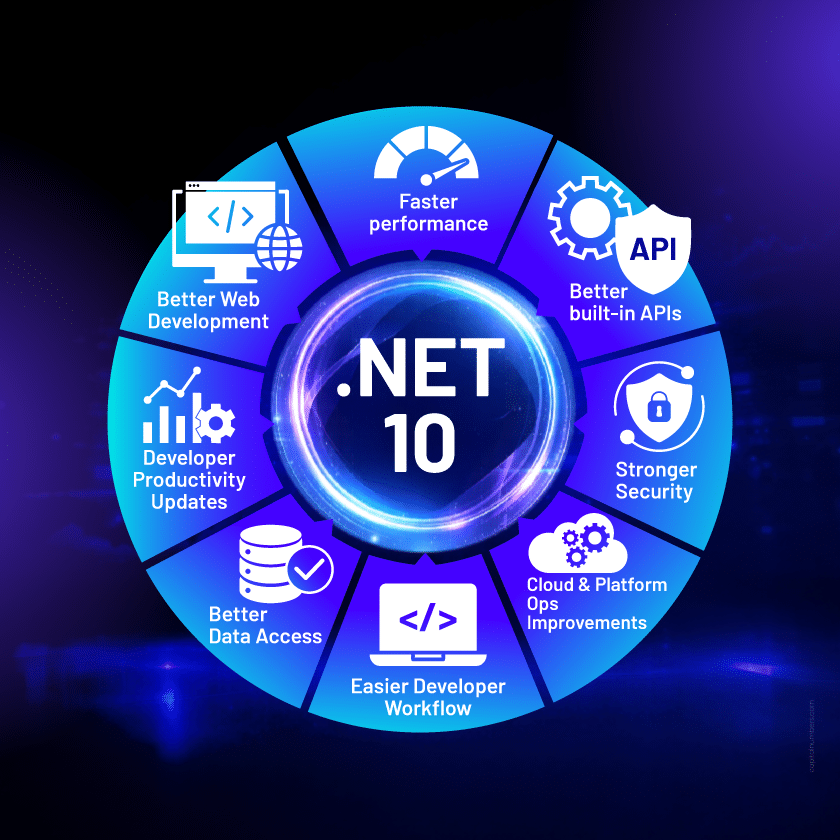
.NET 10 LTS is a use-it-everywhere release: runtime speedups, better built-in APIs, tighter security primitives, and smoother day-to-day tooling. This section is a simple tour of the .NET 10 new features most teams will notice without having to read every release note.
1. Faster performance (Runtime)
If you track .NET 10 performance, the runtime changes are the headline. The JIT compiler is better at turning your code into efficient machine code, and the runtime adds more optimization hooks and hardware support.
What changed
- JIT improvements
- Better inlining (more small helper methods get folded into the caller).
- Better method devirtualization (more calls get resolved to a concrete type at runtime, so that the JIT can optimize harder).
- Improved escape analysis enables more short-lived allocations to remain on the stack when the JIT can safely prove non-escaping behavior.
- Optimization + platform
- AVX10.x instruction set support on supported hardware, enabling improved vectorization where the runtime and CPU allow.
- NativeAOT enhancements (broader scenario support and improved compile-time analysis, with trade-offs in runtime flexibility).
- Better codegen for struct arguments (less overhead when passing structs around).
- Improved loop inversion and related optimizations (hot loops become cheaper).
Why does it matter
- In .NET software development, performance isn’t one magic optimization. It is dozens of small wins: fewer allocations, fewer virtual calls, less overhead in tight loops. .NET 10 is packed with those kinds of changes.
- Microsoft’s own performance write-ups show examples where better inlining helps the JIT prove data doesn’t escape, enabling stack allocation and cutting allocations dramatically. This reduces GC pressure under load.
Where you’ll feel these .NET 10 performance improvements
- APIs: Higher throughput and steadier latency because the GC has less work.
- Background jobs: Faster batches and fewer CPU spikes in tight processing loops.
- Compute-heavy code: Better vectorization and hardware usage when the CPU supports it.
2. Better built-in APIs (Libraries)
.NET 10 keeps improving the base class libraries so you can do more with fewer custom helpers. The official docs highlight new APIs and updates across common areas like serialization, collections, diagnostics, globalization, numerics, and ZIP handling.
What changed
- General library additions and refinements
- More APIs that work with spans and reduce allocations (useful in text and globalization scenarios).
- Ongoing improvements across the platform libraries (lots of small “quality of life” updates).
- JSON upgrades (practical)System.Text.Json keeps getting sharper because it sits on the hot path for many apps.
- Disallow duplicate properties: Useful when you want stricter input validation and fewer “silent override” surprises.
- Stricter serialization settings: Helps catch problematic JSON patterns earlier (especially in advanced metadata-like scenarios).
- PipeReader support: Better fit for streaming and high-throughput processing, where you want to avoid extra buffering.
Why does it matter
- Libraries are where most application code lives day to day. When core APIs get faster, stricter, and more allocation-friendly, the gains show up everywhere: fewer edge-case bugs, cleaner code, and better performance without needing extra utilities or custom plumbing.
Where you’ll feel these .NET 10 library improvements
- APIs: More reliable request handling and better JSON correctness, especially with strict validation.
- Streaming & messaging workloads: Lower overhead when processing large payloads or continuous data flows.
- Global apps & text-heavy systems: Better efficiency in formatting, parsing, and text/globalization operations where allocations add up.
3. Stronger Security (Cryptography)
.NET 10 continues a clear trend: push modern crypto into the platform so teams don’t roll their own. The .NET libraries update calls out major work in post-quantum cryptography and improvements to ML-DSA.
What changed
- Post-quantum cryptography (PQC) expansion: .NET 10 expands platform-supported cryptography APIs to include post-quantum algorithms such as ML-KEM and ML-DSA, depending on OS and cryptographic provider support.
- Windows CNG support for PQC scenarios(called out in the .NET 10 overview).
- ML-DSA improvements
- HashML-DSA and Composite ML-DSA support.
- Simpler APIs to make adoption cleaner and less error-prone.
- AES KeyWrap with Padding support for common enterprise use cases.
Why does it matter
- Security standards are moving fast, and crypto choices have a long-term impact. By adding first-class, supported primitives, especially for PQC, .NET 10 helps teams prepare for future compliance needs while reducing risk compared to ad-hoc libraries and custom implementations.
Where you’ll feel these .NET 10 security improvements
- Regulated industries: Easier alignment with evolving security expectations and audits.
- Enterprise apps: Stronger, platform-supported crypto options reduce implementation risk.
- Long-lived systems: Better future readiness for post-quantum adoption without major rewrites.
4. Cloud + Platform Ops Improvements (Networking, System Support, Containers)
This is one of the .NET 10 new features that removes friction in production systems—especially for teams running services in the cloud, containers, or cross-platform environments.
What changed
- Networking + system support
- WebSocketStream Makes WebSocket usage feel more like working with a stream, which can simplify certain app patterns.
- TLS 1.3 support for macOS clients Helpful for cross-platform client apps and SDKs that rely on modern TLS behavior.
- Windows process group support Better signal isolation and process control (useful for services, workers, and orchestrated workloads).
- Containers (more “default path”, less scripting)
- Console apps can create container images natively.
- A new property lets you explicitly set the container image format.
Why does it matter
- These changes make systems easier to run and manage. Cleaner shutdowns, more predictable behavior, fewer platform-specific workarounds, and simpler container builds usually translate into fewer operational issues and smoother deployments.
Where you’ll feel these .NET 10 ops improvements
- Real-time apps: Cleaner WebSocket handling for streaming and interactive features.
- Cross-platform clients & SDKs: More consistent security behavior with TLS 1.3 on macOS.
- Services & background workers: Better process isolation and shutdown control in production.
- CI/CD pipelines: Streamlined container creation without the need for extra scripting.
- Containerized applications: Easier image creation and deployment, making scaling and management simpler.
5. Easier Developer Workflow (SDK + CLI)
A lot of upgrade pain is tooling pain. .NET 10 LTS smooths out testing, CLI usage, and tool execution so your day-to-day work (and CI) is less fragile.
What changed
- Testing
- dotnet test supports Microsoft.Testing.Platform (a modern testing path the SDK recognizes).
- CLI improvements
- More consistent command usage patterns (standardization helps teams and scripts).
- Shell tab-completion script generation and CLI introspection via --cli-schema.
- Tooling execution (less ceremony)
- dotnet tool exec for one-shot execution.
- A new DNX tool execution script that forwards arguments to dotnet and simplifies running tools.
- Better cross-platform tool compatibility via any RuntimeIdentifier for platform-specific tools.
- Visual Studio alignment (important for teams)
- Starting with .NET 10, msbuild.exe and Visual Studio 2026 can run MSBuild tasks built for .NET, which matters for custom task authors and reduces split-brain builds.
- The .NET 10 download page lists Visual Studio support as Visual Studio 2026.
- For teams standardizing IDEs, Visual Studio 2026 .NET 10 Support is a real plus because it helps avoid it-builds-in-CLI-but-not-in-VS gaps.
Why does it matter
- These changes make upgrading to .NET 10 easier, especially in CI/CD, repo tooling, and local dev setups. Teams can now upgrade with fewer interruptions and avoid common workflow problems.
Where you’ll feel these .NET 10 workflow improvements
- CI/CD pipelines: Smoother execution and fewer setup issues.
- Local development: Consistent CLI behavior and easier tool usage.
- Team workflows: Fewer IDE and build inconsistencies across platforms.
6. Better Web Development (ASP.NET Core 10)
If you build web apps or APIs, this is where you’ll look first. The official overview of .NET 10 calls out Blazor improvements, OpenAPI enhancements, and minimal API updates.
What changed
- Blazor: Faster startup times and a better developer experience.
- OpenAPI: Continued improvements to API description and integration, making it more robust.
- Minimal APIs: Ongoing updates that reduce boilerplate code and improve developer ergonomics.
Why does it matter
- These changes in ASP.NET Core enhance performance, simplify development, and improve scalability. The updates are designed to make building web apps and APIs faster and more efficient, with better memory management and more intuitive APIs.
Where you’ll feel these ASP.NET Core 10 improvements
- Blazor apps: Reduced load times and better memory handling for long-running services, making applications more responsive.
- API development: Easier API description and better integration capabilities, reducing manual work in creating and maintaining APIs.
- Minimal APIs: Less boilerplate, leading to more streamlined code and faster development cycles, making it easier to build lightweight web services.
7. Better data access (EF Core 10)
EF Core 10 introduces improvements that reduce the need for workaround code, especially around query filters.
What changed
- LINQ enhancements and performance optimizations: Ongoing improvements in query translation and execution for better performance.
- Better Azure Cosmos DB support: Improved integration and handling for Azure Cosmos DB.
- Named query filters with selective disabling: You can define multiple filters per entity (like soft delete and tenant filtering) and selectively disable the ones needed for a specific query.
Why does it matter
- These changes simplify complex scenarios like multi-tenancy and soft deletes, making them easier to implement and maintain. With better LINQ performance and improved query handling, development becomes faster and more efficient, while reducing errors and technical debt in long-term projects.
Where you’ll feel these EF Core 10 improvements
- Multi-tenant systems: Cleaner, more manageable setups for multi-tenancy and soft deletes, without the need for custom workarounds.
- Azure Cosmos DB apps: Faster and more reliable performance with Azure Cosmos DB integration.
- Query management: More flexible and cleaner query handling with named filters, making it easier to maintain and scale queries across large codebases.
8. Developer Productivity Updates (MAUI + Desktop + Languages)
.NET 10 improves day-to-day developer experience across client apps and languages. These aren’t “one big headline” changes, but they reduce friction for teams building cross-platform apps, maintaining desktop systems, or scaling large codebases.
What changed
- MAUI + Desktop MAUI (cross-platform)
Windows Forms (WinForms) A high-level what’s-new page with updates for WinForms in .NET 10. WPF WPF now has its own "what’s new" overview page detailing updates and fixes in .NET 10. - MediaPicker improvements: Support for multi-file selection and image compression.
- WebView request interception: Enhanced control over web content in apps.
- Android API level 35 and 36 support: Expanded Android compatibility.
- Language updates (C# 14, F#, Visual Basic) C# 14 on .NET 10
Visual Basic on .NET 10
F# on .NET 10 - Extension members (extension blocks) for cleaner type extensions.
- Null-conditional assignment for shorter null-safe code.
- nameof supports unbound generic types.
- More implicit conversions for Span<T> / ReadOnlySpan<T>.
- Field-backed properties to reduce boilerplate and improve performance.
- Partial constructors and events for large codebases.
- User-defined compound assignment operators for more readable operators.
- Unmanaged generic constraint support.
- OverloadResolutionPriorityAttribute support for better overload selection.
- Included as part of overall language/tooling updates (details in the main “what’s new” hub).
Why does it matter
- These updates keep client apps aligned with modern platforms and make large codebases easier to maintain. For teams modernizing desktop apps, building MAUI apps, or scaling backend systems with C#, the payoff is smoother upgrades, fewer platform gaps, and cleaner code with less boilerplate.
Where you’ll feel these productivity improvements
- Cross-platform apps (MAUI): Easier media features and stronger WebView control.
- Mobile apps: Better compatibility with newer Android API levels.
- Desktop apps (WinForms/WPF): Smoother modernization and clearer update paths.
- C# teams: Cleaner syntax and better maintainability across large codebases.
- VB/F# teams: More capable constraints and tooling alignment for long-term support.
Should You Upgrade to .NET 10 LTS?
If you’re deciding whether .NET 10 LTS is the right move, the answer depends less on what’s new and more on how you run and maintain your systems. Here’s a practical way to think about it.
When .NET 10 makes sense
- You’re planning a long-term production baseline and want an LTS release with predictable support and fewer breaking changes over time.
- Your applications are performance-sensitive (APIs, background workers, high-throughput services) and can benefit from runtime, JIT, and GC improvements.
- You want to standardize tooling, CI/CD, and IDE support around a stable version instead of chasing short-term releases.
When you should wait
- You rely on critical third-party NuGet packages that are not yet validated or supported on .NET 10.
- Your current .NET version is stable, well-tested, and not hitting performance, security, or tooling limitations.
- You’re in the middle of a major refactor or platform migration where adding a runtime upgrade would increase risk.
Workloads that benefit most
- Web APIs and backend services built with ASP.NET Core, where performance, throughput, and memory usage matter.
- Background processing systems, schedulers, and batch jobs that run under sustained load.
- Enterprise applications that need long-term support, stronger security primitives, and predictable upgrade cycles.
- Teams are modernizing or consolidating multiple apps onto a single, stable .NET baseline.
In short, .NET 10 LTS is worth upgrading to when stability, performance, and long-term maintainability matter more than being on the very latest runtime.
How to Upgrade to .NET 10
Upgrading to .NET 10 with your team or by hiring .NET developers is usually simple, but a little preparation saves a lot of rework. Use the checklist below to move in safely and in an orderly manner, and avoid common surprises.
Before you upgrade (quick checklist)
- List what you’re upgrading
- Apps, services, shared libraries
- Current target frameworks (NET8.0, NET9.0, etc.)
- Where they run: Windows/Linux/macOS, containers, cloud
- Check dependencies
- NuGet packages (any major framework packages first)
- Build/CI environment has the .NET 10 SDK
- Test tools/runners still work with dotnet test
- Know what to re-test>
- JSON (only if you enable stricter options like duplicate-property checks)
- Security/TLS (important for security-heavy apps; macOS TLS 1.3 client behavior)
- CLI/tooling if your pipeline is script-heavy (CLI improvements can change assumptions)
Upgrade steps (safe order)
- Install the .NET 10 SDK
- On dev machines + CI build agents
- Update global.json if you use it (keeps everyone on the same SDK)
- Upgrade in phases
- Libraries → Services → Apps
- Keeps the blast radius small
- Update target frameworks
- Change projects to net10.0
- Keep upgrade PRs focused (avoid refactors in the same PR)
- Run tests + quick smoke checks
- Build + test
- Sanity-check 2–3 core flows (login, one key API, one background job)
- If you use containers
- Rebuild images and confirm they start and pass health checks
- .NET 10 improves built-in container image support, so validate your output matches expectations
After you upgrade (prove it)
- Benchmark the basics
- Startup time
- CPU
- Allocations (GC pressure)
- Throughput
- p95/p99 latency
- Validate platform-specific behavior
- macOS TLS behavior (if you have macOS clients)
- Windows service/worker shutdown behavior (signals/process control)
- MAUI/desktop builds and a basic run-through (if applicable)
- Watch-outs (keep it short)
- Strict JSON settings can reject payloads you previously accepted
- Scripted pipelines may need minor tweaks due to CLI/tooling changes
Want to avoid surprises? Book a 30-minute discovery call with our experts in enterprise .NET development services. We’ll review your current .NET version, workloads (APIs, background jobs, desktop/MAUI), and deployment setup, then map a safe, realistic path to upgrade to .NET 10.
Frequently Asked Questions
1. Is .NET 10 an LTS release?
Yes, .NET 10 is a Long-Term Support (LTS) release with three years of support.
2. Should I upgrade from .NET 8 or .NET 9 to .NET 10?
Most production workloads should target .NET 10 LTS after validating dependencies.
3. What are the biggest improvements in .NET 10?
Runtime performance, tooling stability, ASP.NET Core updates, EF Core enhancements, and security improvements.
4. .NET 10 safe for enterprise workloads?
Yes, .NET 10 LTS is designed for long-term, production-grade use.

Subhajit DasDelivery Manager
With around two decades of experience in IT, Subhajit is an accomplished Delivery Manager specializing in web and mobile app development. Transitioning from a developer role, his profound technical expertise ensures the success of projects from inception to completion. Committed to fostering team collaboration and ongoing growth, his leadership consistently delivers innovation and excellence in the dynamic tech industry.