
Website Optimization vs Redesign vs Replatforming: How To Choose

Delivery Manager
10th March, 2026
In 2026, your website is doing more than “representing the brand.” It’s quietly deciding how fast prospects trust you, how easily customers find answers, and how smoothly your teams can ship updates. When performance slows, leads dip, or your CMS becomes a daily bottleneck, it’s a clear signal that something needs to change.
The next question becomes unavoidable: Do we tune what we have, refresh the experience, or replace the foundation? That decision is where many businesses lose time and budget - not because they choose to invest, but because they choose the wrong type of investment.
A full redesign can look impressive and still fail to improve conversions. A replatform can take months, only to reveal that the real issue was content, UX, or performance. And “optimization” can become a patchwork if the underlying platform is already limiting growth.
This guide helps you make the call with clarity. We’ll break down what optimization, redesign, and replatforming actually mean in business terms, the signals that point to each path, and how to choose based on outcomes like speed, conversion, risk, and delivery velocity rather than assumptions or aesthetics.
Website Optimization vs Redesign vs Replatforming: What Each One Means
Before involving your in-house team or partnering with a website development company, align on what these options actually mean. They solve different problems, and choosing the wrong one is how budgets get wasted.
Website optimization:
It is about improving what already exists. The goal is to improve performance and business results without changing the underlying platform. In business terms, it means faster load times, better SEO, stronger accessibility, fewer drop-offs in key journeys, cleaner analytics visibility, and a more stable site. The typical scope is focused: your highest-impact pages and journeys (home, product, pricing, lead capture, checkout), not a full rebuild.Website redesign:
It changes how the site feels and works for the user. It’s used when the experience isn’t building trust or guiding people to action. A redesign improves information architecture, navigation, UX/UI, content hierarchy, and brand credibility. Most successful redesigns start with the top customer journeys first, then expand to supporting pages and content.Website replatforming:
It changes the site's foundation. This involves upgrading or replacing the CMS or commerce platform, its integrations, and, often, the hosting or runtime environment. The goal is to reduce platform risk and enable faster, more reliable delivery, especially when the existing system is difficult to update, integrate, or scale. In many cases, replatforming helps organizations improve security, scalability, and long-term maintainability.
What stays vs what changes
- Optimization: The foundation stays, but performance and user experience are fine-tuned for better efficiency.
- Redesign: The experience layer changes, refining the look, feel, and interaction without altering the underlying platform.
- Replatforming: The foundation changes, shifting to a new platform or technology stack that supports long-term scalability and flexibility.
Once the options are clear, the best choice isn’t the biggest one; it’s the one that improves outcomes fastest, with the least risk.
Website Transformation Decision Checklist
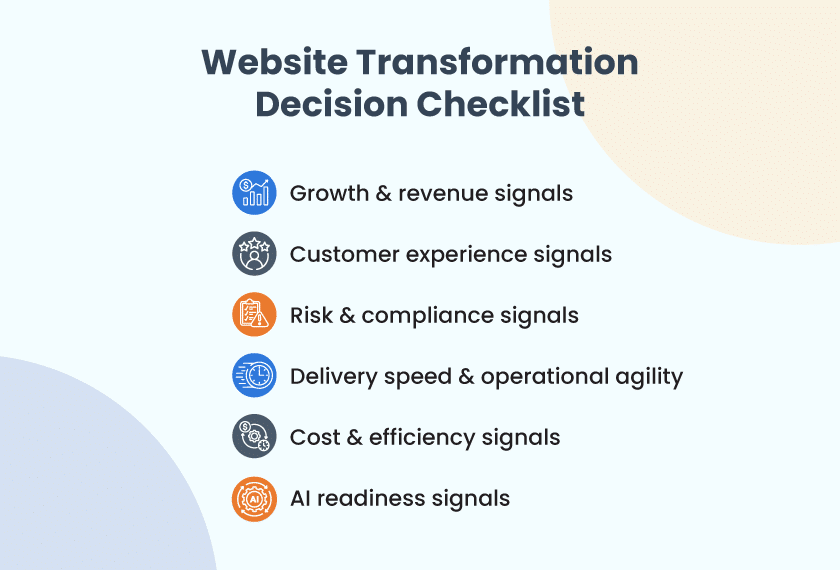
Before you optimize, redesign, or replatform a website, align on outcomes. Start with a discovery phase to confirm what’s really causing the gaps, then decide based on business impact.
1. Growth and revenue signals
Check whether the website is affecting demand quality, conversion, or revenue movement.
- Is the conversion rate, lead-to-opportunity rate, or checkout completion trending down?
- Is traffic stable, but pipeline quality, AOV (Average Order Value), or retention weakening?
- Is the website failing to help deals move forward because buyers cannot self-educate or compare options?
2. Customer experience signals
Check whether users can move through key journeys confidently.
- Are bounce rates or drop-offs high on pricing, product, checkout, or lead capture pages?
- Does the mobile experience feel slow, confusing, or hard to act on?
- Are support tickets rising because people cannot find answers or complete tasks?
3. Risk & compliance signals
Check whether the current platform is creating exposure.
- Are upgrades or patches delayed because they are risky or complex?
- Do you have accessibility gaps (legal risk) or weak privacy signals (trust impact)?
- Are security requirements rising faster than your stack can support?
4. Delivery speed & operational agility
Check whether your teams can ship changes consistently.
- Can your team ship meaningful updates weekly without rollbacks, hotfixes, or downtime?
- Are releases blocked by manual QA, dependencies, fragile integrations, or slow approvals?
- Do teams avoid shipping because the platform feels unstable?
5. Cost & efficiency signals
Check whether hidden costs are growing.
- Real costs are climbing: incidents, vendor/tool sprawl, rework, platform maintenance?
- Simple changes take too long (hidden cost of slow delivery)?
- Is the opportunity cost growing because the website roadmap is always “stuck”?
6. AI readiness signals
If you have an AI-powered website that includes smarter search, personalization, and more, the website foundation matters even more.
- Is your content clean and structured enough for search, recommendations, or personalization?
- Do you have a usable taxonomy and reliable tracking?
- Is ownership and governance clear across teams?
How to use the results
- If the pain is mainly about clarity and conversion (messaging, UX, journeys, content), prioritize optimization or redesign.
- If the pain is about risk and delivery (security/compliance, end-of-life tech, fragile integrations, slow releases, performance limits), a replatform is likely required, even if only one area is severely impacted.
- If both are true, plan a phased transformation: stabilize and modernize the foundation first, then redesign the highest-impact journeys.
When a Hybrid Approach Works Best
Many businesses do not need an all-at-once project. A phased approach often lowers risk and shows value faster. Examples:
- Replatform the foundation first, then redesign the highest-impact journeys
- Optimize key pages now while a larger platform migration is being planned
- Redesign top conversion journeys first, then modernize long-tail pages in later phases
This avoids the common mistake of forcing a full transformation when a staged roadmap would be faster and safer.
Website Optimization: What You Need to Do
Optimization is the right call when you don’t need a new website, you need better results from the one you already have, fast.
Steps to follow:
Step 1: Baseline the issues
Review analytics, Core Web Vitals, and top entry/exit pages to identify where users slow down or drop off.
Step 2: Define success metrics
Pick 2–3 outcomes (conversion rate, lead completion, checkout completion, bounce) so progress is measurable and aligned.
Step 3: Prioritize key journeys
Focus on the flows that directly influence pipeline or revenue, not the entire site at once.
Step 4: Fix speed on the pages that matter
Optimize images, scripts, fonts, and third-party tags on high-traffic/high-value pages first.
Step 5: Reduce friction in actions
Simplify forms, shorten steps, clarify CTAs, and improve error handling so users can complete tasks easily.
Step 6: Clean up technical SEO
Resolve indexing, redirects, broken links, metadata gaps, and structured data issues to protect organic visibility.
Step 7: Strengthen trust and accessibility basics
Improve contrast, labels, privacy cues, and accessibility gaps to build confidence and reduce exposure.
Step 8: Tighten tracking and iterate
Validate events and funnels, then ship improvements in small releases and measure each change.
What optimization won’t fix:
- Confusing site structure and weak content hierarchy
- A navigation experience that doesn’t match how customers buy
- A platform that’s hard to update, risky to patch, or slow to release
If these issues persist after optimization, the problem is likely structural (UX/content) or foundational (platform).
Website Redesign: What You Need to Do
A redesign is worth it when the experience is what’s holding you back. If customers feel lost, unsure, or unconvinced, better visuals alone won’t fix it. The redesign has to improve clarity, trust, and decision-making.
Steps to follow:
Step 1: Clarify the outcomes and audience
Align on what the redesign must improve (leads, demo requests, bookings, checkout, trust) and who the site must persuade. Step
2: Audit what’s not working today
Review analytics, heatmaps, recordings, and feedback to find where users get confused, hesitate, or drop off.
Step 3: Fix information architecture first
Redesign navigation, page hierarchy, and content grouping so users can self-educate and move forward faster.
Step 4: Rewrite the core story and page messaging
Update positioning, benefits, proof points, and CTAs so the site speaks to how customers actually evaluate options.
Step 5: Redesign key journeys before the full site
Start with the pages that drive decisions (home, product/service, pricing, case studies, lead capture/checkout).
Step 6: Design a scalable UI system
Create consistent components, spacing, and patterns so the website stays clean and maintainable as it grows.
Step 7: Plan content and assets deliberately
Define what needs rewriting, what can be reused, and what requires new visuals (product shots, team, process, testimonials).
Step 8: QA with real scenarios and launch in phases
Validate across devices and browsers, protect SEO with redirects, then roll out the highest-impact pages first.
What redesign won’t fix:
- A platform that’s end-of-life, insecure, or painful to patch
- Slow releases caused by brittle integrations or outdated workflows
- Core performance limits that come from the stack, hosting, or architecture
If the experience improves but delivery speed and stability don’t, the constraint is likely the platform.
Website Replatforming: What You Need to Do
You do it when the current stack creates risk, slows delivery, or blocks capabilities you need next.
Steps to follow:
Step 1: Confirm the “why” with evidence
Document the platform pain clearly - security risk, end-of-life versions, slow releases, fragile integrations, or rising maintenance costs.
Step 2: Define the target platform and success criteria
Decide what you’re moving to and why - better performance, stronger security, easier editing, scalability, or integration flexibility (for example, whether a headless CMS fits your delivery model better than a traditional setup).
Step 3: Map integrations and data flows
List every dependency (CRM/ERP, payments, analytics, marketing, search, SSO) and how data moves between systems today.
Step 4: Plan migration scope and approach
Decide what gets lifted as-is, what gets rebuilt, what gets retired, and what needs refactoring to reduce complexity.
Step 5: Design the new architecture and environments
Finalize hosting/runtime, caching, deployment model, observability, and rollback strategy before moving traffic.
Step 6: Rebuild integrations in a safer way
Replace brittle point-to-point connections with more maintainable patterns (APIs, queues, well-defined contracts).
Step 7: Migrate content and validate SEO
Move content cleanly, preserve URLs where possible, implement redirects, and protect search visibility.
Step 8: Cut over in phases with monitoring
Start with low-risk sections, measure performance, then scale the rollout while watching error rates, speed, and conversion impact.
What replatforming won’t fix:
- Weak messaging, unclear positioning, or poor content quality
- Confusing journeys and navigation that don’t match how customers decide
- Conversion issues caused by UX friction rather than technical constraints
Once the platform is stable, the next gains usually come from UX, content clarity, and conversion-focused improvements.
Website Optimization vs Redesign vs Replatforming: How Much Does It Cost?
Costs vary by site size, complexity, integrations, content volume, and approvals. The easiest way to estimate effort is to think in terms of cost band, cost drivers, and effort shape.
Website Optimization
Typical cost band: Low to Medium
- Cost drivers: Number of templates/pages in scope, performance blocks, SEO fixes, tracking setup, experimentation needs.
- Typical effort shape: Short cycles (2–6 weeks), incremental releases, and faster time-to-value.
Website Redesign
Typical cost band: Medium to High
- Cost drivers: Information architecture changes, number of page templates, content rewrite volume, new visuals/photoshoot, design system depth, CMS limitations.
- Typical effort shape: 6–12+ weeks, depending on scope and approvals.
Website Replatforming
Typical cost band: High to Very High
- Cost drivers: Integration count (CRM/ERP/payments/search/analytics), content migration complexity, custom modules, data model changes, SEO/redirect strategy, environment setup, and QA.
- Typical effort shape: Multi-phase (8–20+ weeks), often staged rollout.
Simple pricing reality check
- If the biggest work is fixing leaks → cost stays low.
- If the biggest work is changing journeys, content, and templates → redesign cost rises.
- If the biggest work is integrations, migration, and platform risk removal → replatforming dominates cost.
Next Steps: Build a Website Roadmap That Holds Up in 2026
Website expectations keep rising, but you still need to improve results without taking on unnecessary risk. A clear roadmap helps you choose the right path - optimization, redesign, or replatforming—and sequence work so you can ship improvements sooner.
Start with a short audit, compare 2–3 practical options, and build a phased plan that improves key journeys, strengthens performance, and keeps your foundation ready for faster releases and smarter experiences over time.
Want to figure out which path fits your website best? Book a 30-minute discovery call with our team. We’ll review your current setup, spot the biggest gaps, and share clear next steps.
Frequently Asked Questions
1. When should I choose website optimization over a redesign?
You should choose website optimization if your current design is modern and mobile-friendly, but your conversion rates or page speeds are low. Optimization is ideal for businesses with a solid technological foundation that simply needs "tuning" to improve user engagement and Core Web Vitals.
2. Will redesigning my website hurt my SEO rankings?
Only if it is executed without an SEO-first strategy. A poorly managed launch can cause a significant drop in traffic, but a strategic redesign improves rankings by optimizing Core Web Vitals and mobile responsiveness. To protect your SEO, avoid these three "ranking killers":
- Broken Links: Use 301 redirects to map every old URL to its new destination to prevent 404 errors.
- Slow Performance: Ensure fast loading speeds by using modern image formats (like WebP) and minified code.
- Loss of Key Content: Preserve the high-performing text and "semantic" structure that Google already associates with your authority.
3. How long should a website last before needing a redesign?
On average, a website should be redesigned every 2 to 3 years. While a site’s technical "lifespan" may be longer, digital standards in 2026 evolve rapidly. If your site feels slow, looks "off" compared to competitors, or is no longer converting visitors at its previous rate, it is time for a redesign, regardless of its age.
4. Can I replatform without a redesign?
Yes. This is known as a "back-end migration" or a "lift and shift." You can move your website’s underlying technology (e.g., migrating from Magento to Shopify or moving to a Headless CMS) while keeping your existing front-end design virtually identical. Why choose this?
- Infrastructure Issues: Your current platform is slow, insecure, or lacks the features you need, but your users love the current UI.
- Lower Risk: It minimizes the impact on user behavior and brand recognition during the move.
- Faster Deployment: Since you aren't creating new visual assets or UX flows, the project timeline is significantly shorter.
5. How do I know if I need to replatform my website?
Replatforming is necessary when your current technology becomes a barrier to growth. Key signs include:
- Performance Bottlenecks: The site crashes during traffic spikes or feels sluggish regardless of optimization.
- Security Risks: Your platform no longer receives updates, making it vulnerable to modern threats.
- High Maintenance Costs: You are spending more on fixing bugs and legacy code than on new features.
- Lack of Flexibility: Your system cannot integrate with modern tools like AI, Headless CMS, or advanced CRM systems.
If your current backend prevents you from scaling or innovating, it's time to move to a modern, cloud-native architecture.

Subhajit DasDelivery Manager
With around two decades of experience in IT, Subhajit is an accomplished Delivery Manager specializing in web and mobile app development. Transitioning from a developer role, his profound technical expertise ensures the success of projects from inception to completion. Committed to fostering team collaboration and ongoing growth, his leadership consistently delivers innovation and excellence in the dynamic tech industry.