
AI Use Cases That Deliver Real ROI for Businesses in 2026
Table of Contents
In 2026, AI in business is no longer a “let’s try it” project. It is a business decision. With tighter budgets, higher expectations, and leaner teams, CXOs are increasingly funding AI applications for business and prioritizing AI use cases only when they can prove impact – more revenue, lower cost, less risk, or faster execution.
The easiest way to get real ROI from AI is to start with the outcome, not the model. Don’t ask, “Where can we use AI?” Ask, “Which KPI needs to move this quarter?” When AI is tied to a clear target, like reducing support workload, improving forecast accuracy, speeding up invoice and document processing, or protecting margins, it becomes easier to prioritize, build, and measure.
Here, you will find practical AI use cases for businesses that consistently deliver ROI across four areas: revenue growth, cost reduction, risk control, and speed. Along the way, we will highlight what each use case improves and what you should track, so you can pick the right projects and defend the investment with confidence.
What Real ROI from AI Means in 2026
Real ROI in 2026 means AI improves a business metric you already track, and you can prove the lift after it goes live.
ROI is not
- A demo that looks good but never gets used
- “Time saved” with no proof in hours, cost, or output
- Accuracy scores that don’t change business results
- An AI tool that creates extra manual checking work
Where Does AI ROI Usually Show up
- Revenue growth
- Better conversion, smarter pricing, stronger retention
- Track: conversion rate, churn, AOV, gross margin
- Lower costs
- Fewer support tickets, less manual ops work, faster document processing
- Track:cost per ticket, handle time, hours saved, cost per document
- Lower risk
- Less fraud, fewer compliance issues, fewer outages
- Track:fraud loss, chargebacks, audit effort, downtime hours
- Faster execution
- Faster decisions, faster deals, faster delivery
- Track: time-to-decision, time-to-close, cycle time, MTTR
So, before you buy or build AI, choose one business metric you already track, set a clear starting point, and define what improvement looks like. If you can’t measure the impact after launch, it’s not real ROI.
A Simple ROI Scorecard to Prioritize AI Use Cases for Businesses
Use these checks to focus on the uses of AI in the enterprise that can prove ROI in real operations.
- Data readiness
Do we have the data needed, and can we access it easily? - Workflow fit
Who will use it, and where will it sit in their daily work? - Automation potential
What work will it reduce – tickets, manual checks, reporting, document handling? - Time-to-value
Can we launch a useful version in 90 days or less? - Risk level
Does it touch customer data (PII), compliance, or brand reputation? - Measurement plan
What KPI are we improving, what is the baseline today, and what is the target?
Quick ROI formula leaders can align on
- ROI %
ROI % = (Business benefit − Total cost) ÷ Total cost × 100
A benefit can be revenue gained, a cost saved, or a loss avoided. - Payback period
Payback = Total cost ÷ Monthly benefit
This shows how quickly the AI investment pays back.
CXO rule: If you can’t name the KPI, ship a version within 90 days using your team or an AI development company, and measure impact, it’s not a priority AI project in 2026.
Use Cases That Deliver Real ROI in 2026
The following AI use cases for business show how organizations are using AI in business environments to drive measurable ROI.
1. AI Customer Support Copilots That Cut Ticket Volume and Handle Time
Where it fits
- You handle high ticket volume, and the same questions repeat daily
- Support runs across chat, email, in-app, WhatsApp, or voice
- You need better service without adding headcount
ROI metrics
- Cost per ticket
- Average handle time (AHT)
- Deflection rate
- First-contact resolution (FCR)
- CSAT
What to build
- A clean, searchable knowledge base (the “source of truth”)
- A RAG chatbot that answers using your approved documents and sources (not guesswork)
- Agent assist for humans (suggest replies, summarize history, pull policy info)
Common mistakes to avoid
- No handoff to a human when confidence is low
- No monitoring for wrong answers, repeat issues, or sensitive topics
2. AI Sales Enablement That Improves Win Rate and Sales Cycle Time
Where it fits
- Your reps spend too much time on notes, follow-ups, and proposals
- Deals involve multiple stakeholders and longer cycles
- You want more selling time, less admin time
ROI metrics
- Win rate
- Time-to-proposal
- Deal cycle length
- Rep productivity (qualified touches per rep)
What to build
- Call/meeting summaries with action items and follow-ups
- Next-best action suggestions based on deal stage and signals
- Proposal/email drafting with your brand and approval rules
Common mistakes to avoid
- Outputs that sound generic and don’t match your positioning
- No CRM workflow integration (so reps don’t use it consistently)
3. AI Lead Scoring and Pipeline Forecasting That Improves Revenue Predictability
Where it fits
- You don’t trust pipeline forecasts until the last minute
- Good leads get missed, weak deals get too much time
- Leadership needs predictable numbers, not surprises
ROI metrics
- Forecast accuracy
- Qualified pipeline %
- Conversion rate (lead → opp, opp → win)
- CAC (Customer Acquisition Cost) efficiency
What to build
- Lead scoring based on CRM and marketing engagement
- Risk flags for stalled deals (no activity, missing stakeholders, weak intent)
- Forecast dashboards with “why” signals, not just a number
Common mistakes to avoid
- Scoring with too little history or poor data hygiene
- Treating the score as truth (no feedback loop from sales outcomes)
4. AI Pricing and Margin Optimization That Protects Profit
Where it fits
- Discounting is inconsistent, and the margin is leaking quietly
- Pricing decisions rely on gut feel or slow analysis
- You want growth without sacrificing profitability
ROI metrics
- Gross margin
- Discount rate
- Price realization
- Churn after price changes
What to build
- Discount guidance (what to offer, when, and to whom)
- Margin leakage detection (exceptions, unapproved discounts, costly terms)
- Guardrails and approvals (so pricing stays controlled)
Common mistakes to avoid
- “Black box” pricing with no audit trail
- Changing prices without customer-impact monitoring
5. AI Demand Forecasting and Inventory Planning That Cuts Waste and Stockouts
Where it fits
- You struggle with stockouts, dead stock, or both
- Forecasting breaks during promotions, seasonality, or market shifts
- Working capital is tied up in inventory
ROI metrics
- Stockout rate
- Carrying cost
- Write-offs / dead stock
- OTIF (On-time, in-full)
- Working capital impact
What to build
- Forecasting for top SKUs (Stock Keeping Units) and regions first (quick win scope)
- Regular model updates (weekly or monthly) using actual demand and promo calendars
- Exception alerts (unusual spikes/drops) for planners
Common mistakes to avoid
- Trying to forecast “everything” from day one
- Ignoring promo/seasonality inputs (the forecast will drift fast)
6. AI Document Processing That Removes Manual Back Office Work
Where it fits
- You process high volumes of invoices, POs, claims, KYC, contracts, or onboarding docs
- Teams retype data, chase approvals, and fix errors
- Cycle times slow cash flow and customer experience
ROI metrics
- Processing time
- Error rate
- Cost per document
- Cycle time (submit → approve → post)
What to build
- Data extraction and validation (not just OCR)
- Human-in-the-loop for exceptions (so errors don’t scale)
- Audit logs for what changed, who approved, and why
Common mistakes to avoid
- Automating without exception handling
- No audit trail (creates compliance headaches later)
7. AI Fraud, Risk, and Anomaly Detection That Prevents Losses
Where it fits
- Fraud and abuse are increasing (payments, refunds, promo, account takeover)
- Investigations take too long, and false positives annoy good customers
- You need prevention, not just detection after the loss
ROI metrics
- Fraud loss %
- Chargebacks
- False positive rate
- Investigation time per case
What to build
- Real-time risk scoring with clear rules and ML signals
- Case prioritization for investigators (top risk first)
- Explainable alerts (why it flagged) and escalation rules
Common mistakes to avoid
- Blocking users without a review path
- Optimizing only for fraud capture and ignoring false positives
8. Predictive Maintenance & Downtime Prevention for Operations-Heavy Businesses
Where it fits
- Downtime is expensive and disrupts deliveries or SLAs
- Maintenance is reactive and scheduled too late (or too often)
- You have sensor/IoT/log data, but don’t use it well
ROI metrics
- Downtime hours
- Maintenance cost
- Yield/throughput
- SLA penalties
What to build
- Failure prediction for one asset class first
- Early-warning alerts + recommended actions for maintenance teams
- Simple dashboards that show risk level and trend
Common mistakes to avoid
- Starting with too many machines/sites at once
- Building predictions without operational follow-through (alerts ignored)
9. AI for Software Delivery That Speeds Releases and Reduces Incidents
Where it fits
- Releases are slow because QA and triage take too long
- Incidents burn engineering time and slow product work
- You want faster delivery without breaking production
ROI metrics
- Release frequency
- QA cycle time
- Incident MTTR (Mean Time to Repair)
- Engineering hours saved
What to build
- Test case generation + flaky test detection
- Log summarization and incident clustering
- RCA suggestions with guardrails (assist, don’t auto-merge risky changes)
Common mistakes to avoid
- Trusting AI suggestions without thresholds and review
- Measuring “activity” instead of delivery outcomes
10. AI Compliance and Policy Copilots That Reduce Risk and Review Time
Where it fits
- Teams waste time searching policies, controls, and evidence
- Audit prep becomes a recurring fire drill
- You want compliance to move faster without raising risk
ROI metrics
- Audit prep time
- Compliance cost
- Policy violations caught early
What to build
- Policy Q&A copilot with secure retrieval (answers tied to sources)
- Evidence collection, support, and control mapping
- Access control and traceable outputs (logs, citations, approvals)
Common mistakes to avoid
- Letting the copilot access more data than it should
- Answers with no sources (hard to trust, harder to audit)
These examples show how AI in business delivers value when embedded directly into daily workflows rather than treated as standalone tools.
Key Risks Leaders Must Plan For AI Projects (So ROI Doesn’t Collapse Later)
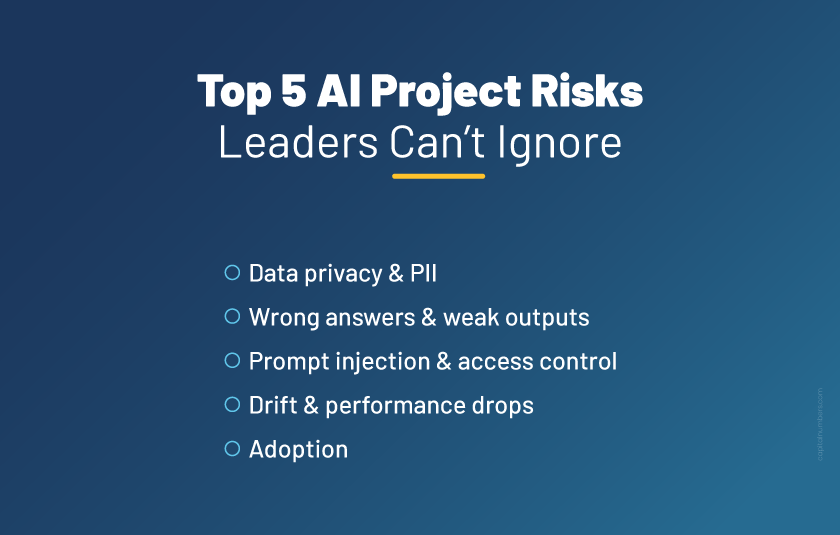
Even strong AI applications for businesses can fail after launch if you don’t plan for the basics. These risks are not “technical details”, they directly affect trust, adoption, and the ROI you expect to see.
- Data privacy and PII
You control what data enters prompts and logs, and you restrict access by role. - Wrong answers and weak outputs
You set confidence checks, safe fallbacks, and a clear path to a human. - Prompt injection and access control
You limit what copilots and agents can see and what actions they can take. - Drift and performance drops
You monitor quality over time and fix it when results decline. - Adoption
You design for daily use and train teams, because usage is what turns AI solutions into measurable ROI.
You May Also Read: The ROI of AI Chatbots: What Business Leaders Need to Know
Bottom Line
In 2026, you get ROI from AI when it improves a KPI you already track and fits into how your teams work every day. The winners are not the most advanced models. They are projects that reduce costs, increase revenue, cut risk, or speed up execution, and can prove it in production.
Keep it simple. Pick 2–3 AI use cases for your business that you can launch within a stipulated timeframe and measure easily. Run a focused pilot, track the KPI impact, and scale only after you see real usage and real results.
If you want to shortlist the right projects and build a practical roadmap, book a 30-minute discovery call with our experts. We will help you identify quick wins and define the KPIs that matter most.
Frequently Asked Questions
1. Do I need a lot of data to get started with AI?
No. Many projects can start with the data you already have in your CRM, helpdesk, invoices, or logs. Start small with one workflow and expand as data quality improves.
2. Will AI replace my team or help my team work faster?
In most businesses, AI works best as a copilot. It reduces repetitive work, speeds up decisions, and helps your team handle more volume without adding headcount.
3. How do I keep AI outputs accurate and avoid wrong answers?
Use source-based answers (RAG where needed), add confidence checks, and set a clear human handoff for edge cases. Also, review outputs during rollout and improve prompts and rules based on real usage.
4. Is it safe to use AI with customer data or internal documents?
If you control access by role, limit what enters prompts/logs, and keep audit logs. For sensitive use cases, add masking and stricter approval flows.
5. What should I budget for an AI project in 2026?
A small, KPI-focused pilot typically costs far less than a full platform rebuild. Budget for build, tools, integration, and ongoing monitoring and support.


 Web Development
 Cloud Engineering
 Mobile App Development
 AI/ML/GenAI
 E-commerce
 Software Development
 UI/UX
UI/UX QA
QA Dedicated Teams