
How Salesforce Implementation Works: Process, Timeline, and Scope

Project Manager
4th November, 2026
|
Quick Answer: Salesforce implementation is the process of planning, configuring, integrating, testing, and launching Salesforce around your business workflows. A single-cloud first release may take 4–8 weeks, while multi-cloud or integration-heavy projects can take several months. Timeline and cost depend on scope, data quality, integrations, customization, and how quickly your team makes decisions. |
A Salesforce license does not give you a working CRM. The value comes from the implementation: how well the platform is configured around your sales, service, and reporting processes, and how reliably your data and teams move onto it.
The decisions that most affect cost, timeline, and adoption are made early: what goes into the first release, how clean your data is before migration, who owns decisions internally, and how users are trained. Get these right, and a Salesforce CRM implementation gives you a trustworthy pipeline view, faster customer response, and a foundation ready for AI. Get them wrong, and budgets and timelines stretch.
This Salesforce implementation guide is for business and technology leaders at growing and mid-market companies planning a new rollout or replacing an existing CRM. It covers the implementation process, first-release scope, timeline, cost, and data migration, so you can build a realistic plan and evaluate any Salesforce implementation partner with confidence.
Capital Numbers delivers Salesforce implementation services for growing and mid-market companies, and the approach below reflects how we run projects.
Is Your Organization Ready for Salesforce Implementation?
Salesforce is not only for large enterprises. Growing businesses may also benefit when spreadsheets, disconnected tools, and manual processes begin affecting sales or customer service. The decision should depend on operational requirements, expected value, implementation costs, and the team's ability to manage the platform.
The strongest Salesforce readiness signals are operational:
- Sales, marketing, service, and finance teams maintain separate versions of customer data.
- Leads are assigned manually, follow-ups depend on personal reminders, or renewals are tracked in individual spreadsheets.
- Managers cannot see an accurate pipeline, conversion rate, or support workload without consolidating reports by hand.
- Customers have to repeat information because teams cannot see the same account history.
- Growth is exposing inconsistent approval, handoff, or compliance processes.
The business case is not “we need a more advanced CRM.” It is “we need a dependable operating system for customer-facing work.” The goal is to build a platform that teams can use every day, rather than implement every available feature from the beginning.
What Does a Salesforce Implementation Actually Include?
Salesforce implementation involves setting up the CRM to support your business workflows, user access, reporting, automation, and integrations. It may also include data migration, which moves information from existing systems into Salesforce, and customization, which extends standard features to meet specific business requirements.
For example, implementation defines how leads move through your pipeline, who approves discounts, which customer records each team can access, and which routine tasks should be automated.
|
Area |
Questions to settle before the build |
|
Products and editions |
Do you need Sales Cloud first, Service Cloud, or another product? Which licenses match the roles people actually perform? |
|
Data and migration |
Which accounts, contacts, deals, cases, files, and historical records are trustworthy enough to move? |
|
Processes and automation |
Which few repeatable actions should be automated first, and where should a person remain responsible for a decision? |
|
Integrations |
Which system owns each shared field when Salesforce connects to ERP, finance, marketing, or support tools? |
|
Security and access |
Who should be able to view, edit, export, or approve sensitive records? |
|
Reporting and AI readiness |
Which decisions need reliable dashboards now, and what data foundation is required before AI agents are considered later? |
Define your Salesforce implementation scope around business priorities, not a long feature list. For sales teams, the first release might include lead routing, account management, opportunity tracking, and forecasting. Service teams may prioritize case management, routing queues, knowledge access, and response-time reporting.
What Are the Six Phases of Salesforce Implementation?
A successful Salesforce implementation follows six practical phases, from discovery and solution design to data migration, launch, and stabilization. Each phase addresses specific business decisions and technical requirements.
Phase 1: Discover Business Needs
Before configuring anything, understand how your teams work today and where the process breaks down. This may include missed leads, slow approvals, duplicate customer records, unclear ownership, or reporting that depends on spreadsheets.
During discovery, map important journeys such as:
- How a lead becomes a customer
- How a customer query is assigned and resolved
- How discounts, contracts, or renewals are approved
- Where teams manually enter, copy, or search for customer data
By the end of this phase, you should have a clear list of priorities, the data you need to move, the people involved, and a realistic scope for the first release.
Phase 2: Architect the Solution
Next, the implementation team translates those priorities into a practical Salesforce design. This is where the team decides how the system should work before configuration begins.
The design should define:
- The Salesforce products, licenses, and standard features needed
- The customer data to capture and how it should be structured
- User roles, permissions, and record visibility
- Essential reports and dashboards
- Automations, integrations, and release priorities
A well-designed plan prevents unnecessary customization. It also makes it easier to keep the first release maintainable and ready to grow with the business.
Phase 3: Configure Salesforce
The implementation team configures the platform to reflect the agreed processes, without making the system difficult for users to understand.
The work may include:
- Setting up accounts, contacts, leads, opportunities, cases, and custom fields
- Creating page layouts that show each role the information they need
- Building reports and dashboards for sales, service, and leadership teams
- Setting up validation rules and permissions to protect data quality
- Using Salesforce Flow to automate lead assignment, reminders, approvals, and notifications
Use standard Salesforce features wherever possible. Consider Apex or Lightning Web Components only when configuration cannot meet the requirement. This keeps the platform easier to test, maintain, and improve. Test configuration and custom changes in a Salesforce sandbox before deploying approved updates to production.
Phase 4: Migrate Data and Integrate Systems
Salesforce data migration is often the most sensitive part of a first-time rollout. Moving poor-quality information into a new CRM simply transfers the old problems into a more advanced system.
Before migration, the team should:
- Remove duplicate accounts, contacts, and leads
- Standardize formats for names, phone numbers, countries, and dates
- Decide which inactive or outdated records should be retained, archived, or excluded
- Map each legacy field to the correct Salesforce field
- Test sample records using tools such as Salesforce Data Loader, verify external ID mappings where needed, and validate the results before full migration.
Real-World Example: We migrated data from SuiteCRM to Salesforce for a healthtech company, resolving missing account relationships and inconsistent records. We also transferred historical contracts and PDFs, helping the client consolidate customer data into one CRM while preserving important documents.
From our projects: Data cleanup is where first releases most often lose time, and the cause is usually ownership rather than tooling. When nobody is named to decide which records are current, which duplicates to merge, and which legacy fields to drop, migration stalls. We ask clients to name a data owner during discovery, before any migration work begins.
Integrating Salesforce with other business systems needs the same level of planning. If Salesforce connects with ERP, finance, marketing, or support systems, decide which system owns each type of data and how updates will be handled.
Phase 5: Validate the Implementation
User acceptance testing (UAT) allows future users to use the platform before launch. Instead of just watching a demo, they test it by doing their actual daily work.
Testing should cover:
- Creating and qualifying leads
- Moving opportunities through pipeline stages
- Requesting approvals and receiving notifications
- Managing service cases or customer requests
- Viewing reports and dashboards
- Confirming that users can access only the records and fields relevant to them
Assign an owner and urgency level to every bug. Keep bug fixes separate from new feature requests so testing doesn't spin out of control.
From our projects: User acceptance testing is where users catch what demos hide: a missing field on a page layout, an approval that routes to the wrong person, or a report that doesn’t match how managers actually review the pipeline. Fixing these before launch costs far less than fixing them after.
Build training around specific roles and skills, such as sales reps, managers, service agents, and admins. Short interactive sessions, quick reference sheets, and internal collaboration will boost adoption far better than one generic presentation.
Phase 6: Launch and Stabilize Salesforce
Go-live is not simply the day Salesforce becomes available. It is a planned cutover, followed by a short period of close support while users adjust.
A controlled launch typically includes:
- Data freeze: Pause changes in the legacy system for an agreed window, so the final migration captures current records.
- Final migration and validation: Load the latest data, then confirm record counts, key relationships, and user access before opening the system to everyone.
- Communication and support: Tell users when the switch happens, what changes for them, and who to contact. Assign clear ownership for support requests.
- Fallback plan: Agree in advance what would trigger a rollback or workaround, and who makes that call.
During the first few weeks after launch, monitor:
- User adoption and login activity
- Data quality and duplicate records
- Automation errors or missed notifications
- User questions and support requests
- Whether reporting, lead response times, or case resolution times have improved
This post-launch support period, known as hypercare, typically lasts 1-4 weeks. It helps teams resolve priority issues quickly and support users as they adjust. Use what you learn to set priorities for the next release. Once the platform stabilizes, regular Salesforce administration and ongoing improvements take over.
How Long Does Salesforce Implementation Take?
Salesforce implementation is not a one-size-fits-all project. A focused first release may follow the illustrative timeline below.
- Week 1: Discover
- Weeks 2–3: Architect
- Weeks 3–5: Configure
- Weeks 4–6: Migrate Data and Integrate Systems
- Weeks 6–7: Validate
- Week 8: Launch
- After Go-Live: Hypercare and stabilization (typically 1–4 weeks)
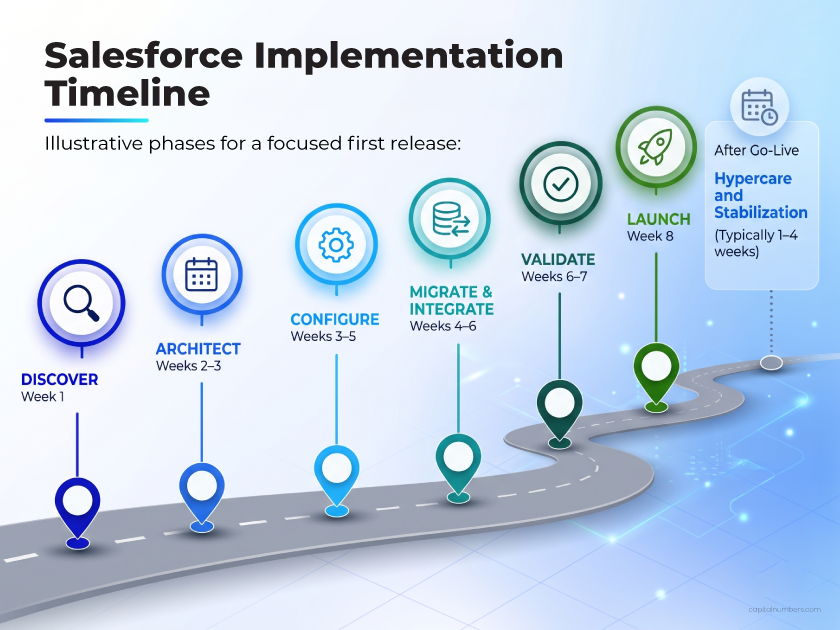
Note: This is an illustrative timeline for a focused first release. The final schedule should be confirmed after discovery, once the scope, data quality, integration requirements, and stakeholder availability are clear. Multi-cloud or integration-heavy implementations may take several months.
From our projects: When a first release slips, the build itself is rarely the cause. More often, decisions are waiting on approvals, or new requests arrive after the design is signed off. Booking regular decision slots with a named project lead from week one protects the timeline better than adding more people to the build.
Want to know how long your Salesforce rollout might take? Discuss your implementation requirements with our team.
How Much Does Salesforce Implementation Cost?
Salesforce implementation cost depends on the products required, data migration, integrations, customization, and project complexity.
Budget for three areas: Salesforce licenses, implementation services (configuration, migration, testing, and training), and ongoing costs (administration, support, and enhancements).
Implementation costs can be estimated using a simple formula:
Implementation Cost = Total Billable Project Hours × Blended Hourly Rate
The following scenarios use an assumed blended rate of $25-$50 per hour to illustrate how costs may vary with project scope.
|
Project scope |
Illustrative timeline |
Total team effort |
Illustrative implementation cost |
|
Basic configuration only |
1–3 weeks |
80–160 hours |
$2,000–$8,000 |
|
Single-cloud first release |
4–8 weeks |
320–640 hours |
$8,000–$32,000 |
|
Integration-heavy implementation |
12–24 weeks or longer |
960–1,920 hours |
$24,000–$96,000 |
Note: Total effort includes billable hours across project team members, not just elapsed time. Salesforce licenses, third-party tools, and ongoing support are excluded from these estimates.
Fixed-price delivery suits clearly defined requirements, while dedicated teams or staff augmentation may suit evolving or ongoing projects. A detailed scope assessment is needed for an accurate estimate.
What Are the Biggest Salesforce Implementation Risks?
Unclear requirements can increase implementation costs and delay delivery. The following risks should be addressed early:
- Scope creep: Use a prioritized backlog and written change control. A new request should state its business value, effort, and impact on the timeline.
- Poor data quality: Assign owners for data cleansing and approve migration rules before full-load testing.
- Weak internal ownership: Assign a project lead, executive sponsor, Salesforce admin or IT owner, and business reviewers. Reserve time for decisions, testing, and approvals.
- Low adoption: Involve future users in testing, train by role, and make adoption measurable after go-live.
- Overpromised AI: Treat Agentforce as a later business case unless the initial release has reliable data, permissions, grounded knowledge, and a governed use case.
Build AI Readiness Without Rushing AI Into the First Release
Salesforce offers native AI capabilities, including Agentforce, its platform for building and deploying AI agents. At Dreamforce 2026, Salesforce also introduced AIforce, which connects Salesforce data and actions with tools teams already use.
However, you do not need to rush to deploy an AI agent in the first release. Agentforce becomes more useful when customer data is reliable, user permissions are clear, business workflows are documented, and teams have agreed on where human review is required.
Designing for AI readiness means creating consistent customer records, defining data ownership, protecting sensitive fields, and measuring the outcomes of existing automation.
At Capital Numbers, we help businesses evaluate and configure Salesforce AI capabilities around practical use cases, with human oversight for validating outputs, handling exceptions, and approving important decisions.
Conclusion
A successful Salesforce implementation is not about turning on every feature at once. It is about solving a clear operational problem, giving teams a simpler way to work, and creating a reliable foundation for reporting, integrations, and future AI use cases.
Keep the first release focused, prepare your data carefully, test real user scenarios, and treat training and post-launch support as essential parts of the rollout.
Ready to plan a Salesforce rollout your team can adopt with confidence?
Start a Salesforce Implementation Roadmap with Capital Numbers to define the right first-release scope, data migration, integrations, governance, and adoption plan before the build begins.
FAQs
How long does Salesforce implementation take?
A focused, single-cloud Salesforce implementation may take 4–8 weeks. Multi-cloud or integration-heavy projects can take several months. Timelines depend on scope, data quality, customization, the number of integrations, and how quickly your team approves decisions. A short discovery phase confirms a realistic schedule for your project.
How much does Salesforce implementation cost?
Implementation cost is total billable project hours multiplied by a blended hourly rate, excluding Salesforce licenses and ongoing support. Scope, data migration, integrations, and customization drive the total. In our illustrative scenarios, a single-cloud first release at an assumed $25–$50 per hour comes to about $8,000–$32,000. These are hypothetical figures, not quotes.
What are the phases of Salesforce implementation?
A Salesforce implementation has six phases: discover business needs, architect the solution, configure Salesforce, migrate data and integrate systems, validate through user acceptance testing and training, and launch and stabilize with post-go-live support. Scope and data decisions are settled before the build begins.
What is included in a first Salesforce implementation?
A first release focuses on the workflows that solve the clearest business problem. This often includes core customer records, lead or case management, pipeline stages, user permissions, essential reports, basic automation, active-data migration, user acceptance testing, and role-based training. Complex integrations, custom development, and AI agents are usually planned for later releases.
How does Salesforce data migration work?
Salesforce data migration starts with cleaning existing records: removing duplicates, standardizing formats, and deciding which records to keep. The team maps legacy fields to Salesforce fields, tests a sample using tools such as Salesforce Data Loader, then completes the full load. Validation afterward confirms that key records and relationships are accurate.
Can Salesforce integrate with ERP or accounting software?
Yes. Salesforce can integrate with ERP, accounting, marketing, and support systems through APIs, prebuilt connectors, or integration platforms. Before building, define which system owns each shared data set, how often data syncs, how errors are handled, and who maintains the connection.
What should you look for in a Salesforce implementation partner?
Look for a Salesforce implementation partner with certified consultants, experience in similar projects, and verifiable client references. Ask how they handle data migration, integrations, testing, and post-launch support. They should also explain assumptions, pricing, security practices, and potential risks before development begins.
Can we implement Salesforce ourselves, or do we need a partner?
Businesses with experienced Salesforce administrators may handle straightforward implementations internally. Complex data migration, integrations, custom development, or multi-cloud deployments usually need specialist expertise. The decision depends on your team’s skills, project complexity, and available time.

Dwaipayan KhanProject Manager
A Project Manager with over 12 years of experience leading cross-functional teams and delivering end-to-end software solutions. Coming from an engineering and International Business background, he transforms projects having complex technical requirements into high-impact commercial outcomes. He is enthusiastic about Agile delivery best practices, streamlined workflows, and building scalable, business-first tech solutions.