

Enterprise AI
Enterprise AI Development
In 2026:
A Complete Guide for Business Leaders
Top-rated development company with 300+ reviews


Trusted By Global Brands, Growth Companies, And Enterprise Teams
.svg)










What Is Enterprise AI Development?
Enterprise AI development is the process of building AI systems that work inside real business operations, not just as standalone tools. In 2026, that usually means combining AI models, business data, workflow logic, system integration, and governance so AI can support reliable outcomes at scale.
Unlike general AI tools, enterprise AI is built to fit the way work actually happens. It uses the right business context, connects with existing systems, follows clear rules, and includes human review where accuracy, compliance, or risk matter. The goal is not just better output. It is better execution.

Key Takeaways for Business Leaders
The Shift From AI Access to AI Impact
AI is easy to access now, but business value is still uneven because most companies do not struggle to try AI. They struggle to make it work inside real workflows. Enterprise AI addresses this gap by helping businesses move from isolated experiments to measurable operational improvement.
Businesses are asking fewer questions about what AI can generate and more questions about how it can improve the way work gets done. This guide explains what enterprise AI development means today, where it creates value, what makes a system production-ready, and how businesses can move from pilot to practical implementation.

What Does Enterprise AI Mean in 2026?
In 2026, enterprise AI is not just about adding a chatbot or giving teams access to a writing assistant. It is about building AI systems that support real work across the business.
Enterprise AI can include:
- Retrieval-based systems such as RAG
- Embedded copilots inside internal tools
- AI assistants grounded in company knowledge
- Workflow automation with approvals and review steps
- Agent-assisted processes with defined action limits
- Cross-system orchestration across teams and platforms

Successful enterprise AI depends on:
Enterprise AI in 2026 is less about isolated output and more about dependable workflow support.
Why Businesses Are Investing in Enterprise AI in 2026?
Businesses are adopting enterprise AI to accelerate work, improve output, and enhance service quality, while controlling cost and complexity.
- Teams spending excessive time on repetitive tasks
- Decisions taking longer than necessary
- Knowledge is scattered across systems and documents
- Customers expecting faster, higher-quality responses
- Leadership seeking more leverage from existing teams and data
Enterprise AI conversations in 2026 have shifted from broad experimentation to measurable impact. Organizations now focus on workflows where AI can deliver tangible business value.
- Reducing manual effort and repetitive work
- Improving turnaround time for key processes
- Increasing consistency and reliability
- Enabling teams to handle higher volumes efficiently
- Enhancing customer and employee experiences
- Minimizing decision delays in daily operations
The key question is no longer whether AI is interesting, but how it can optimize workflows and improve business outcomes.
Where Can Enterprise AI Create Real
Business Value?
Enterprise AI creates the most value when it improves how work gets done. The strongest use cases usually reduce manual effort, improve consistency, speed up decisions, or help teams move faster without losing control.
Customer support

Best for: Reducing ticket volume, speeding up responses, and helping agents work faster

How AI helps: Answers routine questions, drafts summaries, improves routing, and supports agent workflows

Business impact: Lower manual workload, faster response times, and more consistent service

Example: A SaaS company uses AI to handle common support questions and route billing-related issues for human approval

Internal knowledge search
Best for: Teams that lose time searching across documents, SOPs, project files, or policies
How AI helps: Retrieves and summarizes internal information in a usable format
Business impact: Faster access to knowledge, fewer delays, and less dependency on tribal knowledge
Example: An internal assistant helps employees find SOPs and project information without searching through folders or waiting for responses

Sales and proposal workflows
Best for: Proposal-heavy businesses, account research, and first-draft content creation
How AI helps: Prepares account summaries, proposal drafts, and supporting material faster
Business impact: Shorter sales cycles and less time spent on repetitive preparation
Example: A sales team uses AI to produce a proposal draft in hours instead of days

HR, finance, and legal operations
Best for: Document-heavy workflows where accuracy matters
How AI helps: Extracts data, supports review, summarizes records, and helps classify requests
Business impact: Less manual processing and better throughput with human review still in place
Example: A finance team uses AI to extract invoice details before final review.

Internal workflow automation
Best for: Approval-heavy internal processes such as procurement, IT requests, onboarding, or policy routing
How AI helps: Reads requests, applies business logic, routes tasks, and flags exceptions
Business impact: Fewer process delays and smoother internal execution
Example: A procurement workflow uses AI to read a request, apply policy rules, and route it to the right approver

Customer-facing product features
Best for: Platforms that want to improve search, recommendations, guidance, or self-service
How AI helps: Powers smarter search, improved assistance, and personalized interactions
Business impact: Better product experience, stronger engagement, and improved retention potential
Example: A digital platform adds AI-powered search and recommendations to improve the product experience.

The best starting points are usually not the flashiest ones. They are the workflows where AI can remove friction in a way the business can clearly see and measure.
What Is the Difference Between Pilot AI and Production AI?
Pilot AI is built to test whether an idea is worth pursuing. Production AI is built to work inside a real business process with the controls, integration, and accountability needed for everyday use.
At Capital Numbers, this is one of the clearest patterns we see in enterprise AI work. Many businesses can get to the proof-of-concept stage. The harder part starts when that proof of concept has to work inside live systems, support real users, handle exceptions, and deliver value consistently.
A pilot may look strong in a controlled setup. But production AI has to do more. It has to work with live data, fit existing workflows, follow permissions, support approvals, and produce results people can trust.
Pilot AI usually focuses on:
- Technical feasibility
- Output usefulness
- Early business potential
- Learning quickly with a limited scope
- Initial integration with workflows
Production AI usually requires:
- Integration with real systems
- Workflow triggers and routing
- Validation and review logic
- Role-based permissions
- Monitoring, performance, and adoption
The real question is not only whether the pilot works. It is whether the business is ready to make that pilot usable, trusted, and scalable.
What Is the Difference Between AI Tools and Enterprise AI Systems?
A general AI tool can help someone summarize a document, draft a message, or brainstorm ideas. That is useful, but it does not automatically improve a business workflow.
An enterprise AI system goes further. It can retrieve the right context, apply business rules, support decisions, route work, and involve the right people when review is needed.
For example, asking AI to summarize a support issue is helpful. Building a workflow where AI reads the issue, assesses account context, drafts a response, flags billing risk, and routes the case for approval is more valuable from a business perspective.
Enterprise AI in 2026 is more closely tied to workflow design than to simple tool access.
How Does Enterprise AI Development Work?
Enterprise AI development works best when it is treated as a workflow and systems initiative, not just a model initiative.
At Capital Numbers, we have seen that the model is only one part of the story. In real business settings, results usually depend more on workflow clarity, data readiness, integration quality, control design, and adoption planning.
A practical enterprise AI workflow includes:
- Retrieve the right context
- Apply business rules or logic
- Generate a draft, recommendation, or classification
- Validate the output using checks or thresholds
- Either route it automatically or send it for human review
That is the difference between AI that looks good in a demo and AI that works in daily operations.

1. Start with a clear business use case
Start with the business problem, not the model. The strongest use cases usually involve repetitive work, slow execution, inconsistent outcomes, delayed decisions, or customer friction.
2. Assess data and systems
Check whether the business has the right data, system access, and workflow inputs. A promising AI idea can stall quickly if the data is fragmented or the integration path is unclear.
3. Build a focused pilot
Before scaling, most businesses need to test the use case in a controlled way. The goal is not perfection. It is to prove usefulness, practicality, and measurable value.
4. Integrate into real workflows
This is where AI either becomes useful or gets stuck. A solution may work in a demo, but it creates value only when it fits into everyday work and connects to the right systems, decision points, and users.
5. Add human oversight where needed
Human review is not a weakness. In many enterprise settings, it is what makes adoption possible. It helps teams build trust, manage risk, and maintain output quality.
6. Deploy, monitor, and improve
Once the system is live, the work is not over. Strong enterprise AI systems improve through real usage, exception analysis, prompt refinement, retrieval improvement, and better workflow tuning.
What Makes an AI System Production-Ready?
A production-ready AI system includes the context, controls, human oversight, integration, and monitoring needed for reliable day-to-day use.
| Area | What It Should Do | Why It Matters |
|---|---|---|
| Business context | Use the right internal data, records, documents, or live system inputs | Reduces generic or unreliable output |
| Workflow fit | Support real routing, approvals, handoffs, and next-step actions | Increases adoption and business usefulness |
| Human oversight | Add a review where risk, compliance, finance, or customer impact matters | Builds trust and reduces avoidable errors |
| Controls and permissions | Enforce access boundaries, role-based permissions, and policy rules | Supports security and governance |
| Evaluation and monitoring | Track quality, exceptions, confidence, workflow performance, and user adoption | Helps teams improve reliability over time |
| Fallback and escalation logic | Define when work proceeds automatically, when it pauses, and when it escalates | Prevents low-confidence automation from creating risk |
| Cost discipline | Monitor model use, orchestration overhead, and workflow-level economics | Protects long-term ROI |
| Continuous improvement | Refine prompts, retrieval, routing, and business logic as the system evolves | Keeps the system useful as needs change |
Production-ready AI is not just about generating a strong answer once. It is about delivering reliable performance in everyday business conditions, with clear thresholds for when work should proceed, retry, pause, or escalate.
What Are the Biggest Challenges in EnterpriseAI Adoption?
The biggest challenge is not getting access to AI. It is making AI useful, reliable, and workable inside real business operations.
The Blockers Behind Failed AI Adoption

Starting with tools instead of problems
Clarify business objectives, users, existing systems, technical constraints, dependencies, priorities, risks, and expected outcomes.

Data quality and fragmentation
If data is outdated, incomplete, or spread across disconnected systems, output becomes less reliable.

Lack of trust in outputs
If outputs are too generic, hard to validate, inconsistent, or not grounded in business context, users will not rely on the system in daily work.

Poor workflow integration
A good demo is not enough. If AI does not fit the actual workflow, adoption usually stays low.

Security and compliance concerns
Businesses need clear safeguards around data privacy, access control, governance, auditability, and regulatory requirements.

Pilots not reaching production
Many AI initiatives stall because the use case was unclear, the data was not ready, workflow fit was weak, or ownership was missing.
Most enterprise AI failures occur between pilot success and workflow integration, when technical promise meets operational reality.
How Can Businesses Solve These AI Adoption Challenges?
AI adoption works better when the approach stays focused, practical, and tied to a real workflow.At Capital Numbers, we usually see better progress when businesses stop treating AI as a broad transformation initiative too early and start treating it as an operational improvement opportunity with clear boundaries.
The Five Moves That Matter
Prioritize one workflow, not a broad ambition
AI performs better when it starts inside a clearly defined process with measurable business value. A narrower starting point usually leads to faster learning and less delivery risk.
Strengthen the data and system foundation
If the data is fragmented or the system landscape is disconnected, output quality and user trust usually suffer. In many cases, this foundation work matters more than the first model decision.
Build controls into the workflow
Human review, approval logic, fallback paths, validation checks, and exception handling help reduce risk and make the system easier to trust and scale.
Improve the system through real usage
The strongest AI systems improve through live feedback, real exceptions, workflow-level refinement, and operational learning.
Use the right delivery path
Some businesses begin with a pilot and then move into phased implementation. Others start with a smaller managed team focused on one workflow, one business unit, or one integration cluster at a time.
In our view, the goal is not to move fast for the sake of movement. It is to move in a way that makes production adoption more likely.
Should You Use Off-the-Shelf AI or Build a Custom Enterprise AI Solution?
The right choice depends on how specific the problem is and how deeply AI needs to fitinto your systems, workflows, and governance model.

Off-the-shelf AI works well for:
- Faster setup
- Lower upfront cost
- General productivity support
- Early validation before deeper investment
- Quick wins without heavy integration

Custom enterprise AI works well for:
- Deeper workflow integration
- Use of internal business data
- Stronger control over security and governance
- Approval logic or business-specific process design
- Scalable, enterprise-owned system
Off-the-shelf AI vs custom AI at a glance
Flexibility
Off-the-shelf AI
Limited to built-in settings
Custom AI development
Built around business needs
Cost
Off-the-shelf AI
Lower upfront cost
Custom AI development
Higher upfront investment
Security
Off-the-shelf AI
Standard controls
Custom AI development
Greater control
Integration
Off-the-shelf AI
Often limited
Custom AI development
Built for internal systems and workflows
Factor | Off-the-shelf AI | Custom AI development |
|---|---|---|
Flexibility | Limited to built-in settings | Built around business needs |
Cost | Lower upfront cost | Higher upfront investment |
Security | Standard controls | Greater control |
Integration | Often limited | Built for internal systems and workflows |
If the need is broad and simple, a ready-made tool may be enough. If the goal is to improve a core workflow, use internal data, or build something the business can scale and own, custom development is often the stronger path.
How Much Does Enterprise AI
Development Cost?
Enterprise AI development costs vary based on the problem you are solving, the quality of your data, the number of systems involved, and how much control the business needs.
In most cases, the real cost is shaped less by the model itself and more by integration, workflow design, governance, testing, and long-term operating effort.
What usually drives cost?
Use case complexity
Data readiness
Integration needs
Custom business logic
Security and compliance requirements
Ongoing operations such as monitoring, review, retries, and updates

Enterprise AI costs can be broken down into four key areas:
| Cost Area | What It Includes |
|---|---|
| Build cost | Initial design, development, prompting, logic, and workflow setup |
| Integration cost | Connecting business systems, data sources, and APIs |
| Governance cost | Testing, review logic, permissions, monitoring, and controls |
| Operating cost | Model usage, workflow orchestration, maintenance, tuning, and support |
In 2026, the better question is not just, “How much will this cost?” It is also, “Will this system create enough value per workflow or per outcome to justify long-term use?”
How Should Businesses Evaluate AI Opportunities Before Investing?
Before investing in AI, businesses need to ask a practical question: where can AI create real value without adding too much risk or complexity?
A useful evaluation framework usually looks at five things:
| Evaluation Area | What to Ask |
|---|---|
| Business impact | Is the problem important enough to solve? |
| Data readiness | Is the required data available, usable, and trustworthy? |
| Workflow fit | Can AI fit naturally into the way work already happens? |
| Risk level | Does this use case need human review, approval, or stricter controls? |
| Success metrics | Can outcomes be measured clearly? |
Useful success metrics include:
- Time saved
- Faster turnaround
- Better customer experience
- Lower manual effort
- Improved consistency
- More output without matching headcount growth
The best AI investments usually do not start with the biggest idea. They start with the right one.
What Does an Enterprise AI System Look Like
An enterprise AI system is not just a chatbot or a single model connected to data. It is a working setup of business data, retrieval, logic, integrations, controls, monitoring, and human review.
These are the core layers of an enterprise AI system
Data layer
Internal documents, customer records, product information, support history, or operational data
Retrieval and context layer
Pulls the right business context at the right time so outputs are grounded and relevant
AI models and logic layer
Processes inputs using prompts, business rules, validation checks, and response formatting
Evaluation and control layer
Includes output evaluation, confidence checks, fallback rules, approval logic, exception handling, and audit visibility
Integration layer
Connects AI with CRM, ERP, support tools, dashboards, databases, APIs, and multi-step workflows
Workflow and execution layer
Handles routing, next steps, updates, approvals, and operational execution
Human review layer
Adds oversight where accuracy, compliance, or customer impact matters
Monitoring and governance layer
Tracks quality, workflow performance, error patterns, operating cost, policy compliance, and user adoption over time
Common integration patterns often include CRM systems, support platforms, internal knowledge bases, ERP tools, document repositories, and approval-based workflows.
Properly integrated, these AI layers embed into operations, boosting adoption, reducing rework, and improving reliability.
What Happens When You Delay AI Adoption?
Delaying AI adoption does not just postpone innovation. In many cases, it extends inefficiency.
The risks often include:
- Continued manual effort in workflows that could be improved
- Slower response and decision cycles
- Weaker operating leverage as demand grows
- Underused business data and internal knowledge
- Slower progress compared to competitors, improving similar workflow
The point is not to adopt AI everywhere at once. It is to avoid falling behind in the places where AI can already improve execution in a practical way.

How Can Businesses Solve These AI Adoption Challenges?
AI adoption works better when the approach stays focused, practical, and tied to a real workflow.At Capital Numbers, we usually see better progress when businesses stop treating AI as a broad transformation initiative too early and start treating it as an operational improvement opportunity with clear boundaries.
The Five Moves That Matter
Prioritize one workflow, not a broad ambition
AI performs better when it starts inside a clearly defined process with measurable business value. A narrower starting point usually leads to faster learning and less delivery risk.
Strengthen the data and system foundation
If the data is fragmented or the system landscape is disconnected, output quality and user trust usually suffer. In many cases, this foundation work matters more than the first model decision.
Build controls into the workflow
Human review, approval logic, fallback paths, validation checks, and exception handling help reduce risk and make the system easier to trust and scale.
Improve the system through real usage
The strongest AI systems improve through live feedback, real exceptions, workflow-level refinement, and operational learning.
Use the right delivery path
Some businesses begin with a pilot and then move into phased implementation. Others start with a smaller managed team focused on one workflow, one business unit, or one integration cluster at a time.
In our view, the goal is not to move fast for the sake of movement. It is to move in a way that makes production adoption more likely.
How to Get Started with Enterprise AI?
Getting started with enterprise AI does not require a broad transformation plan from day one. In most cases, the better path is to begin with one workflow where the value is clear, the scope is realistic, and results can be measured.
At Capital Numbers, we usually see stronger results when businesses begin with a practical use case rather than a broad AI ambition. The best starting points often involve repetitive manual effort, slow internal decisions, scattered knowledge, approval bottlenecks, or customer-facing workflows where speed and consistency matter.
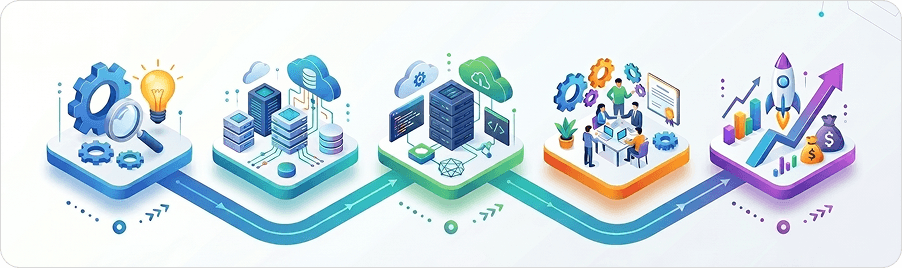
A good starting approach usually includes:
- Identifying the right business problem
- Keeping review where needed
- Reviewing data and system readiness
- Scaling based on evidence
- Choosing a focused pilot scope
If a business is already seeing repetitive manual effort, delays caused by scattered data, or an AI pilot that showed promise but did not move into production, that is usually a sign that the next step needs more structure, not more experimentation.
The goal is not to launch AI everywhere at once. It is to identify one business workflow where AI can create operational value in a controlled, measurable way and then build from there.
Frequently Asked Questions About Enterprise AI
Enterprise AI development is the process of building AI systems that operate inside real business workflows. These systems use business data, integrations, controls, and review logic to improve decisions, automate repeatable work, and support reliable execution at scale.
A focused pilot may take a few weeks. A broader production-ready solution may take a few months, depending on data readiness, workflow complexity, and integration needs.
Costs vary based on scope, data quality, integrations, workflow design, governance requirements, and post-launch support. In many cases, operating cost matters almost as much as initial build cost.
It can be, but security depends on how the system is designed. Access controls, deployment choices, data handling rules, governance, and review logic all play an important role.
Not always. Many businesses start with an external partner and involve a smaller internal team for business context, approvals, and decision-making.
ROI usually comes from time saved, lower manual effort, faster turnaround, better customer experience, stronger consistency, or handling more work without growing headcount at the same pace.
Awards & Recognition

CNBC TV-18 Most Trusted Brands India 2021
The Manifest - Most Reviewed Software Developers 2024

Financial Times - High-Growth Companies Asia-Pacific 2024

ET NOW - Best Tech Brands 2024

TIMES - Business Awards 2024 - Excellence in AI Solutions

ET Now- Best Tech Brands 2025

NASSCOM - SME Inspire 2025 - Growth Leadership in Tech Services

Clutch - Global Winner 2026

India Cross-Border Excellence Awards 2026

Times Business Awards 2025 - Excellence in AI Solutions
CNBC TV-18 Most Trusted Brands India 2021
The Manifest - Most Reviewed Software Developers 2024
Financial Times - High-Growth Companies Asia-Pacific 2024
ET NOW - Best Tech Brands 2024
TIMES - Business Awards 2024 - Excellence in AI Solutions
ET Now- Best Tech Brands 2025
NASSCOM - SME Inspire 2025 - Growth Leadership in Tech Services
Clutch - Global Winner 2026
India Cross-Border Excellence Awards 2026
Times Business Awards 2025 - Excellence in AI Solutions
Get Custom Software Solutions, Recommendations, Resumes, or, Estimates.
Fill Out the Form and Get Guaranteed Response Within 24 Hours
Expert guidance you can trust. No pitch, just expert solutions.